![Opus1-3-icon-color-1.png]](https://kb.opus1.io/hs-fs/hubfs/Opus1-3-icon-color-1.png?height=50&name=Opus1-3-icon-color-1.png)
This article explains what going live means during your migration to opus1.io.
Going live is the final step of the migration process. Once your business goes live, opus1.io becomes the system you use to manage your day-to-day operations.
When you go live, a member of the opus1.io team will enable automated notifications for your account. These notifications are automatically sent to clients and staff based on activity in your opus1.io account. For more information on automated notifications sent from opus1.io, visit Client Automated Email Notifications.
After going live, opus1.io should be used as the primary system for running your business, including:
- Viewing schedules for students and staff
- Registering new students
- Managing billing and payments
- Handling daily administrative tasks
Sending Manual Notifications Before Going Live
Before automated notifications are enabled, it is recommended that you manually invite clients to claim their accounts.
You can send invitation emails using one of the following methods:
- Click the Email Clients button on the calendar to send invitations in bulk. For more information, or to utilize a suggested template, view How do I notify all users how to claim their account before my business goes live?
- Click Send Invitation Email on an individual client’s profile:
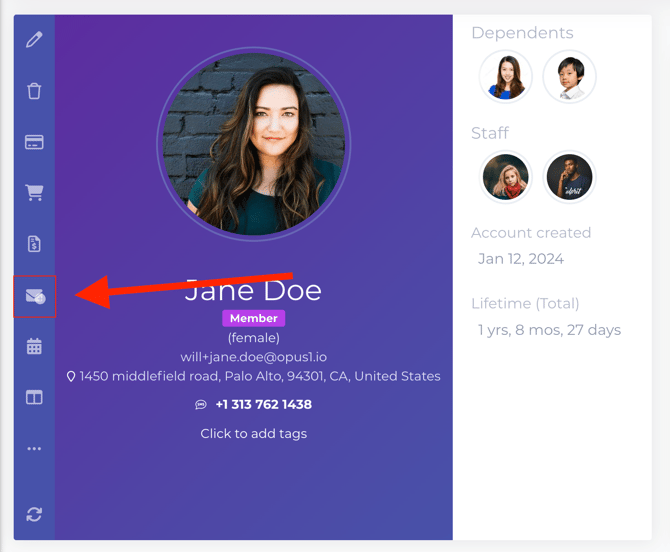
These invitations allow clients to set their password, access their opus1.io account, and add a payment method when applicable. These steps also help to ensure your clients are prepared to begin using opus1.io once automated notifications are enabled.
Additional Client Communications
You may also send other communications to clients before going live, including:
- Leaving client-facing comments on client profiles to share important information, reminders, or updates that clients can see when they log in to their opus1.io account
- Sending proposals to clients to confirm lesson schedules, services, or pricing so clients can review and accept them directly through opus1.io