![Opus1-3-icon-color-1.png]](https://kb.opus1.io/hs-fs/hubfs/Opus1-3-icon-color-1.png?height=50&name=Opus1-3-icon-color-1.png)
Applies to: Owner, Manager, Staff
PLUS Feature: Yes
Plan: Opus1 PLUS
Last updated: September 24, 2026
Table of Contents
- Overview
- Who gets notified, and when
- When a prospect is assigned to you
- When a follow-up date comes due
- The You have a new lead email
- Keeping your own call list on the board
- Permissions
- FAQ
- Related Articles
Overview
A trial inquiry that sits for three days usually goes cold. The family has already booked with someone who called back on day one. The Prospects board in Opus1.io assigns each lead to a staff member and puts a date on the next call. Without a nudge, though, those two fields only help people who remember to open the board.
Opus1.io now handles the nudge for you. The staff member responsible for a prospect hears about it at two moments: when the lead becomes theirs, and on the day they planned to follow up.
Why: Speed-to-lead. Nobody has to relay an assignment by text, and a follow-up date stops being a promise that only the board remembers.
Who gets notified, and when
| What happens | Who is notified | What they get |
|---|---|---|
| A family submits your lead capture form | Owners and Managers | The You have a new lead email |
| A staff member is assigned to a prospect, by hand or by auto-assign | The staff member who was assigned | A notification naming the prospect |
| An open prospect's Next follow-up date arrives | The prospect's assigned staff member | A reminder that the prospect is due for follow-up today |
| A Next follow-up date is set or changed | Nobody | Nothing is sent until the due date |
| A follow-up date passes without anyone acting | Nobody | No repeat reminder. The card shows a red clock tag. |
| A prospect is marked lost or enrolls as a member | Nobody | No follow-up reminders for that prospect |
The family is never notified about who is assigned to them or when you plan to call. These notifications go to staff only.
When a prospect is assigned to you
A prospect in Opus1.io is assigned in one of two ways, and the assigned staff member is notified either way.
By hand. Anyone who works the board (Owners, Managers and Staff) can open a prospect's card and choose someone under Assigned staff. Saving shows Client updated, and the person you picked gets a notification naming the prospect.
Automatically. Owners can turn on Automatically assign staff to new prospects in Business Settings, in the CRM section, and give each staff member a priority. When a family registers themselves or fills in the lead form, Opus1.io picks someone from that list and assigns them. The assignee is notified the same way as for a hand assignment. Setup steps are in How do I automatically assign my staff to prospects in my pipeline?
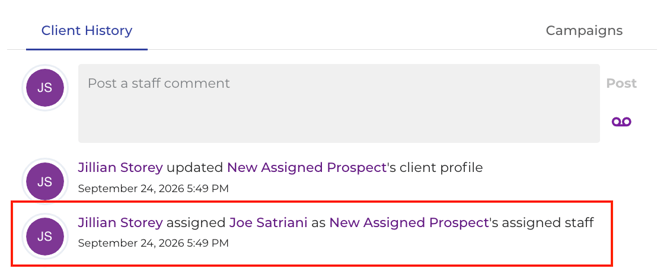
Each assignment is also written to the prospect's activity history. Anyone looking at the prospect later can see who was assigned and when.
When a follow-up date comes due
Next follow-up is the date someone plans to reach out next. To set it, open the prospect's card, click Next follow-up:, and pick a preset (In 1 day, In 3 days, In 7 days, or one, three, six or 12 months) or any calendar day.
On that date, Opus1.io sends a reminder to the prospect's assigned staff member. Three things decide whether it goes out:
- The date has to arrive. Setting or changing a date sends nothing. The reminder comes on the day itself.
- The prospect has to be open. A prospect in any active column, Prospect (sleep) included, still gets reminders. Once someone marks the prospect lost, or enrolls them on a plan that makes them a member, reminders stop.
- Someone has to be assigned. The reminder goes to the assigned staff member. If Assigned staff reads Not Set, nobody is reminded, so assign someone whenever you set a date.
The reminder goes out once. If the day passes and nobody calls, Opus1.io does not send it again. The card turns red instead, which is why the board still matters. For the meaning of each clock-tag color, see Understanding Follow-Up Date Tags on the Prospect Board.
The You have a new lead email
This is a separate, older email in Opus1.io, and it is easy to mix up with the assignment notification.
- When it sends: a family submits your lead capture form.
- Who gets it: Owners and Managers. Staff members do not get it, even when auto-assign picks them.
- What it is for: telling the people who run the school that a new family has come in.
- Turning it off: an Owner or Manager can turn on Opt out of manager/owners email notifications on their own staff profile.
If you are a Staff member and a new lead has been assigned to you, the assignment notification is what you get, not this email.
Keeping your own call list on the board
The follow-up reminder arrives once, on one day. Anything you missed yesterday won't come up again in your notifications, so the Prospects board in Opus1.io is still your full to-do list.
- Open Clients > Prospects.
- Turn on Show only my prospects to see only the leads assigned to you.
- Turn on Show only overdue to narrow that to prospects whose Next follow-up date has already passed.
- Work down the list. After each call, set a new Next follow-up date so the next reminder is already booked.
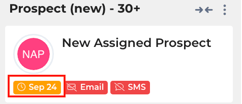
An orange clock tag means the follow-up is due within the next 48 hours:
A red one means it is overdue: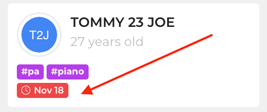
Permissions
| Role | Open the Prospects board | Assign staff and set Next follow-up | Set up auto-assign | Receives assignment and follow-up notifications | Receives You have a new lead |
|---|---|---|---|---|---|
| Owner | Yes | Yes | Yes | Yes, when assigned | Yes, unless opted out |
| Manager | Yes | Yes | No | Yes, when assigned | Yes, unless opted out |
| Staff | Yes | Yes | No | Yes, when assigned | No |
The Prospects board is part of Opus1 PLUS. Limited Staff cannot open it.
FAQ
Will the family see who is assigned to them or when we plan to call?
No. Assigned staff and Next follow-up only appear on the staff Prospects board, and the notifications go to staff only.
I added a prospect myself. Why wasn't anyone assigned or notified?
Auto-assign only runs for families who come in on their own, through the lead form or self-registration. Prospects the office creates stay Not Set until someone picks Assigned staff. The person picked is then notified.
Does calling or texting a prospect update Last follow-up?
No. Last follow-up only updates when staff post a staff message or comment on the prospect. Phone calls, SMS and campaign emails do not change it.
A prospect enrolled, but their card still shows a red clock tag. Will I keep getting reminders?
No. Enrolled and lost prospects don't get reminders. The clock tag follows the saved date, though, so it stays until someone clears Next follow-up.
Related Articles
- How do I use the Prospect Board? — the full pipeline, from new lead to enrolled student
- Understanding Follow-Up Date Tags on the Prospect Board — what the red and orange clock tags mean
- How do I automatically assign my staff to prospects in my pipeline? — set up round-robin assignment with priorities
- How can I embed the lead capture form in my website? — where new leads, and the You have a new lead email, come from
- Client Comments vs. Staff Comments — the staff comments that update Last follow-up
- Configuring Default Client and Staff Notifications — how staff notification settings are managed