![Opus1-3-icon-color-1.png]](https://kb.opus1.io/hs-fs/hubfs/Opus1-3-icon-color-1.png?height=50&name=Opus1-3-icon-color-1.png)
Applies to: Owner, Manager, Staff, Limited Staff
PLUS Feature: No
Plan: All
Last updated: October 20, 2026
Table of Contents
- Overview
- Why client comments don't send mention emails
- Who a client comment does email
- How to notify a coworker about a student
- Other places where @ sends an email
- When the person you mention can't open the comment
- FAQ
- Related Articles
Overview
Maya's teacher wants the office to see Tuesday's practice note, so they type @Jordan at the start of a client comment and post it. Jordan teaches Maya too and can open her Client comments, but Jordan never gets an email. Client comments don't support mentions, so @Jordan is just part of the note.
Opus1.io keeps two comment boards on every client profile, and they notify different people. Client comments are the conversation with the family. Staff comments are the conversation about the family, among your team. A mention is a staff alert, so it lives on the staff side.
Why: A mention that emailed coworkers from Client comments would put an internal alert inside a message the family can read. Keeping mentions on Staff comments means an office note about Maya's attendance never lands in her parent's inbox.
Why client comments don't send mention emails
Client comments don't support mentions. Whatever follows an @ in a client comment stays part of the note, whether you typed the name out or it looks highlighted like a tag. No coworker is emailed, and the family receives the note with the name in it.
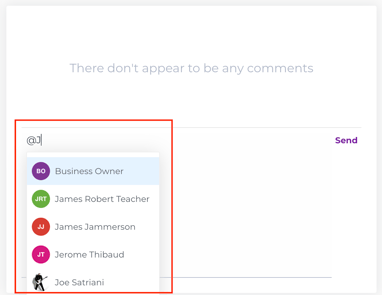
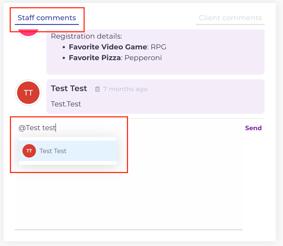
On Staff comments, typing @ opens a list of your staff. Clicking a name turns it into a link to that person's staff profile, and that link is what triggers the email. A name you type out in full without clicking it stays plain text, even on Staff comments, and plain text does not notify anyone.
Who a client comment does email
Client comments still send email. They go to the family, or from the family to one teacher, and never to the wider staff.
| Who posted | Who Opus1.io emails | What they receive |
|---|---|---|
| A teacher, Staff, Manager, or Owner | The client and their account managers | An email that a message was posted for that client, with the note and any attached files |
| The client or an account manager | The one teacher they pick under Who should be notified of this comment? | The same kind of email, sent only to that teacher |
Being able to read a client comment and being emailed about it are separate. If two teachers both teach Maya, both see a new note the next time they open her profile, but only the family is emailed when the studio writes it.
Families can only post once an Owner turns on Allow clients to post messages? under Settings > Business > General. The family's comment box has no @ either. Picking a teacher from Who should be notified of this comment? is how a family reaches someone at your school. For the full setup, see Who can see client comments and staff comments?
How to notify a coworker about a student
- Open the client's profile in Opus1.io.
- Select Staff comments.
- Type @ click the person's name in the list. The name turns into a link.
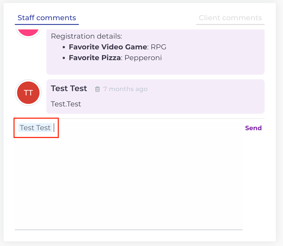
- Write the note and post it.
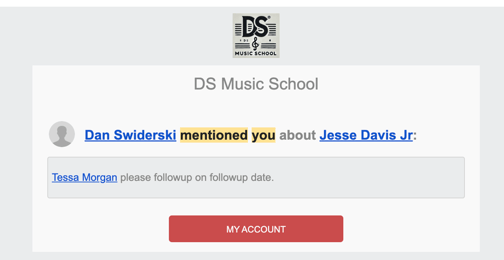
Jordan receives an email with the subject You have been mentioned. It names who wrote the comment and which client it is about, and it includes the comment itself. The mention arrives by email only.
The family never sees Staff comments and is never emailed about them. When both should know something, post twice: the practice plan on Client comments for Maya's mom, and the office note on Staff comments with Jordan mentioned.
Other places where @ sends an email
Opus1.io has a mention list wherever the comment stays inside your team.
| Place | Who can read it | What @ does |
|---|---|---|
| Staff comments on a client profile | Staff and above, plus Limited Staff for their own students when you allow it | Emails each staff member you pick, about that client |
| Class comments on a group class | Staff and above. The class page notes these are not sent to clients | Emails each staff member you pick, about that class |
| Comments on a time off request | People who can open that request | Emails each staff member you pick, about that request |
| Client comments | The family, their teachers, and Staff and above | Nothing. Client comments don't support mentions |
Message Class Clients on a group class is a different action, meant for lesson notes the families should have. You choose a date range, and Opus1.io copies your note onto the Client comments of each student enrolled on a class date in that range, then emails each of those students and their account managers. Students who were in the class only outside that range are not included. It does not notify staff.
When the person you mention can't open the comment
The mention email from Opus1.io includes the full comment, but it does not give the person access to the board. A Limited Staff teacher who has not been allowed to see Staff comments, or who does not currently teach that student, still receives the email and can read what you wrote in it. They cannot log in and open the thread or reply to it.
A Limited Staff teacher's own students are the people they have taught in the last 15 days or are scheduled to teach in the next 15 days. To let a Limited Staff teacher read and post Staff comments for those students, change their permissions on their staff profile. Who can see client comments and staff comments? walks through it.
Because the email carries the whole note, mention only the people who should read it.
FAQ
Will the family see an @ I typed in a client comment? Yes. It is part of the note the family receives, and it notifies no one on your staff. Families never see Staff comments, Class comments, or time off comments, so they never see a mention that actually notified someone.
Can a family @ mention a teacher? No. When a family posts on Client comments, Opus1.io asks them to pick one of the student's teachers under Who should be notified of this comment? That teacher is the only person emailed.
Can I turn on mention emails for client comments in notification settings? There is no setting for it. Client comments do not send staff mentions in any configuration. Use Staff comments when a coworker needs an email.
Can I mention more than one coworker in the same comment? Yes. Type @ and pick each person from the list. Everyone you pick receives their own copy of the mention email. A name you type without picking it from the list is not added.