![Opus1-3-icon-color-1.png]](https://kb.opus1.io/hs-fs/hubfs/Opus1-3-icon-color-1.png?height=50&name=Opus1-3-icon-color-1.png)
Applies to: Owner / Manager / Staff
PLUS Feature: No
Plan: All
Last updated: October 22, 2026
Table of Contents
- Overview
- Transfer or Move: which to use
- Before you transfer a student
- How to transfer a student to another group class
- Choosing when the current subscription ends
- What happens to make-up credits
- What happens to invoices
- Notifications
- When Transfer to another class is missing
- FAQ
- Related Articles
Overview
Students change classes all the time. A beginner is ready for the intermediate group, a family's Tuesday afternoons fill up with soccer, or a teacher's Saturday class closes and everyone needs a new home. A transfer in Opus1.io handles that change in one flow: it ends the student's current group class subscription on the date you choose, enrolls them in the new class on a new subscription, and moves their unused make-up credits across if you want it to.
Opus1.io does not adjust billing for you during a transfer. The right answer depends on what the family has already paid and how the two classes are priced, so the transfer takes you through a normal checkout where you can set the plan and add a discount before anything is charged.
Why: Both class rosters are correct from the date you pick, the student keeps the make-up credits they have earned, and your front desk decides how the money works instead of untangling an automatic adjustment afterwards.
Transfer or Move: which to use
Opus1.io has two ways to change a student's group class, and they do different jobs.
Transfer changes the class the student attends from now on. It ends the current subscription, starts a new one, and goes through checkout. It can move the student to a class in a different group class service, such as from Beginner Guitar to Intermediate Guitar.
Move changes one class date and leaves everything else alone. Use it when a student needs to come on Thursday instead of Tuesday for one week. The student stays on their subscription, there is no checkout, and a make-up credit covers the new date when your cancellation policy allows one. Move also works for drop-in students, which Transfer does not. The full steps are in How do I move a student to a different class date?
Before you transfer a student
Opus1.io offers Transfer to another class when the student has a subscription on that group class and the subscription has not been ended. A subscription is the student's ongoing enrollment and billing for the class. A subscription that is already scheduled to end later can still be transferred, as long as the new end date falls before the scheduled one.
A drop-in student, meaning one who comes to a single date without being enrolled in the class, has no subscription, so Transfer is not available for them. Use Move instead.
For a one-time event such as a workshop, the same choice on the student's menu reads Transfer to another event.
Owners, Managers, and Staff can transfer students.
How to transfer a student to another group class
Start from the first class date the student will no longer attend. Opus1.io uses that date to suggest when the current subscription ends.
- Find the class date on the student's profile, in Today, or on the class roster.
- Select Update to open the class date.
- On the student's row, open the menu (the three vertical dots).

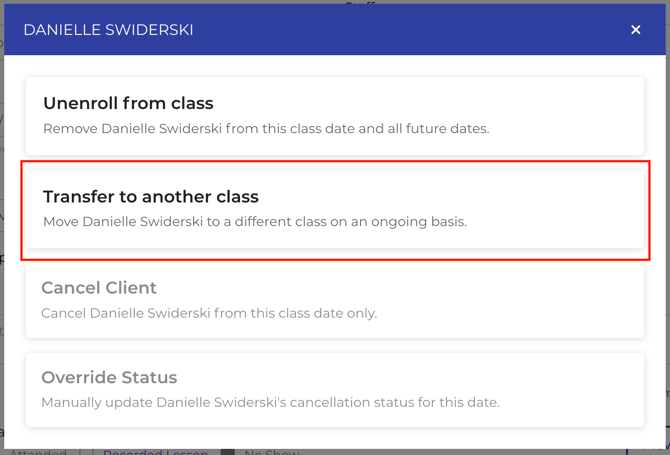
- Select Transfer to another class. The Class Transfer page opens.
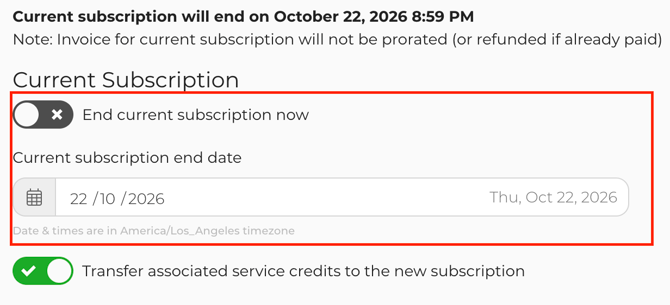
- Under Class Transfer From, check when the current subscription will end. See Choosing when the current subscription ends below for how the suggested date is set.
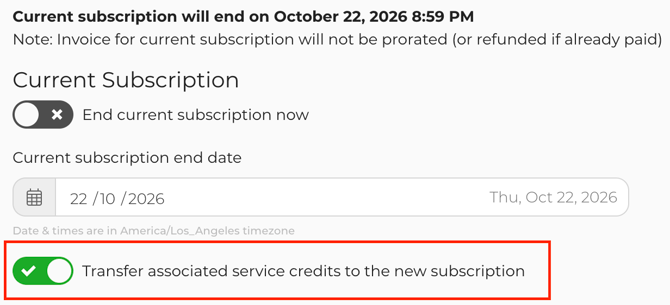
- Leave Transfer associated service credits to the new subscription on if the student's unused make-up credits should follow them. It is on when the page opens.
- Under Class Transfer To, choose the group class service, the class, and the student's first date in the new class. The student is already filled in. The list includes classes in the same service and in other group class services, including classes earlier today.
- Select Payment. Choose the payment plan, the payer, and the payment method, the same way you would for a new enrollment.
- Review the first invoice for the new class. Add a discount if the family has already paid for dates that overlap, then complete checkout.
A confirmation reading Client has been enrolled in, followed by the class name, tells you the transfer worked. The student's profile now shows the new class in their upcoming schedule and a new subscription alongside the one that is ending.
Choosing when the current subscription ends
Class Transfer From states when the current subscription will end and when the new subscription will start. The new subscription starts on the first date you picked in the new class.
Opus1.io suggests an end date based on the class date you started from:
- If the student has an earlier date on the same subscription, the suggested end is the end of the day of that earlier date. The date you started from is the first date the student leaves.
- If you started from the student's first date on the subscription, the suggested end is that date's start time, so the student leaves from that date.
- If the suggested end has already passed, End current subscription now is turned on for you.
To change the suggestion, either turn on End current subscription now to end the subscription immediately, or set a different Current subscription end date. The end date has to be after today. If the subscription already has an end date, the new one also has to be before it. Opus1.io explains on the page when a date does not qualify.
The student stays on the original class for every date before the end date. From the end date on, they come off that class's roster because the subscription is ending. Those dates are not recorded as individual cancellations.
What happens to make-up credits
A service credit is the make-up credit a student earns when they cancel within your cancellation policy. The Transfer associated service credits to the new subscription toggle decides where unused service credits from the current subscription end up.
- On: the credits move to the new subscription, so the student can use them in the new class.
- Off: the credits stay on the subscription that is ending.
Credits that belong to the student but are not tied to this subscription are not affected either way. Opus1.io leaves them where they are.
What happens to invoices
The Class Transfer page reminds you that the invoice for the current subscription will not be prorated, and will not be refunded if it is already paid. Opus1.io then handles the current subscription's other invoices like this:
| Invoice on the current subscription | What Opus1.io does | What you may need to do |
|---|---|---|
| Paid, or has any payment on it | Leaves it as it is. No refund. | Discount the first invoice on the new subscription if the family paid for dates they will now attend in the new class. |
| Unpaid, due after the end date, and only for this subscription | Voids it. | Nothing. |
| Unpaid, but also covers another subscription | Leaves it as it is. | Check it and adjust it if part of it is no longer owed. |
| Any open invoice on a Tuition Table plan | Leaves it as it is. | Check it and void it if it is no longer owed. |
A Tuition Table plan is one where the price comes from your school's tuition table rather than from the plan itself.
The new class is a new enrollment in Opus1.io. The family is charged according to the plan, payer, and payment method you choose at checkout, and the same discounts and checkout options are available as for any new enrollment.
Tip: If you need to adjust the first invoice before the family is charged, choose to enroll and pay later at checkout, fix the invoice, and then collect payment.
Notifications
Taking the student off the original class does not send them an unenrollment notice from Opus1.io.
The new enrollment sends the usual enrollment notice. To skip it, for example because you have already confirmed the change with the family by phone, open More options on the payment step and turn on Do not notify the client(s) before you check out.
When Transfer to another class is missing
Opus1.io hides Transfer to another class in two cases:
- The student has no subscription on the class. Drop-in students are in this group. Use Move to change a single date.
- The subscription has already been ended. Enroll the student in the new class as a new enrollment instead.
Warning: Do not end the old subscription before you transfer. Once a subscription has been ended, the transfer option disappears, along with the toggle that carries make-up credits to the new class.
Checkout also stops the transfer when the subscription is no longer active or pending, or when the end date breaks the rules in Choosing when the current subscription ends.
FAQ
Can I transfer a student to a class with a different teacher, day, or level?
Yes. Opus1.io lists every class you can enroll the student in, from the same group class service or a different one. Moving a student from Beginner Guitar on Mondays to Intermediate Guitar on Thursdays is a single transfer.
Should I end the old subscription before I transfer the student?
No. The transfer ends it for you on the date you choose. If you end the subscription first, Opus1.io no longer offers Transfer to another class for that student, so you would have to enroll them as new and move any make-up credits by hand.
How do I switch a private lesson student to a different teacher or time?
Transfer is for group classes. For private lessons, Opus1.io uses Replace on the student's subscription, which ends the old lesson series and starts the new one in a single checkout. See How do I change the service associated with a subscription?
A parent enrolled themselves instead of their child. Is that a transfer?
No. Opus1.io has a separate Transfer to Dependent tool that moves classes, subscriptions, and their invoices from the parent's profile to the child's. See When A Parent Accidentally Books Themselves A Lesson Instead of Their Child.
Related Articles
- How do I move a student to a different class date? — change one date without touching the subscription
- How do I enroll my clients into group class services? — the checkout a transfer uses
- How do I end a subscription? — when the student is leaving rather than switching
- How do I add a discount to an invoice? — credit a family for overlap on the new invoice
- What does "Enroll Now and Pay Later" do? — adjust the first invoice before charging
- How do I modify service/monetary credits? — fix make-up credits after a transfer