![Opus1-3-icon-color-1.png]](https://kb.opus1.io/hs-fs/hubfs/Opus1-3-icon-color-1.png?height=50&name=Opus1-3-icon-color-1.png)
Applies to: Owner / Manager / Staff
PLUS Feature: No
Plan: All
Last updated: October 22, 2026
Table of Contents
- Overview
- Move or Transfer: which to use
- Before you move a student
- Move a student to another class date
- How credits and charges work
- What stays the same
- Notifications
- When the Move button is missing
- Changing classes for good
- FAQ
- Related Articles
Overview
Families ask for one-off switches all the time. A student has a recital on Tuesday and wants to join the Thursday class instead, or a family is traveling and can make the Saturday morning group that week. Before Move, the front desk had to cancel the student from one class date, work out whether they had earned a make-up credit, and then enroll them in the other date as a drop-in, which means a student who comes for a single date without being enrolled in the class.
Move does all of that in one step in Opus1.io. It checks your cancellation policy, issues and spends the make-up credit when one is due, and leaves the student's ongoing class, subscription, and invoices alone.
Why: One-off switches take seconds instead of three separate actions, and the same cancellation rules are applied every time, so families are treated consistently.
Move or Transfer: which to use
Opus1.io has two ways to change a student's group class. Move changes one date. Transfer changes the class the student attends from now on. They are separate actions, and Move does not replace Transfer.
| Move | Transfer | |
|---|---|---|
| What changes | One class date | The student's ongoing enrollment |
| Best for | "Can she come Thursday this week instead?" | "She's switching to Thursdays for the rest of the term." |
| Where to start | Move on the class date | Update on the class date, then the student's menu |
| Works for drop-in students | Yes | No. Transfer needs a subscription that has not ended. |
| Can switch to a different group class service | No. Same service only. | Yes |
| Checkout | No. A make-up credit covers the new date when your policy allows one. | Yes. A new enrollment and payment. |
| Future dates | Stay on the original class | Follow the new subscription |
Before you move a student
The group class needs a credit-only plan
Opus1.io books the new date using a per-visit payment plan on the group class that can only be paid with a service credit. That plan is what lets the make-up credit cover the new date without opening checkout. If the group class does not have one, the Move client screen says a credit-only plan is required, and the move cannot be completed.
Add the plan on the group class's Payment tab before your front desk starts moving students. Choosing the Right Payment Plan for your Service covers the plan templates available for group classes.
Who can move students
Owners, Managers, and Staff can move students. Your role needs permission both to enroll students in group classes and to cancel a student from a class date, because Move does both.
Move a student to another class date
- Open the class date. You can start from the class on the calendar, from the student's upcoming schedule on their profile, or from the class details page.
- Select Move. The Move client screen opens.

- Read the note at the top. It confirms that the student will be canceled from the original date and enrolled in the date you choose.
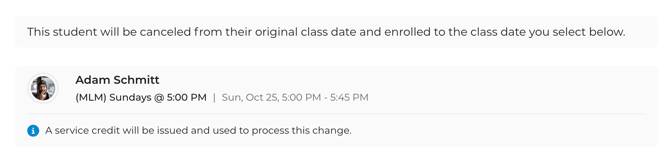
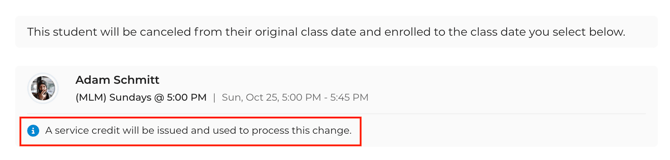
- Read the credit message on the student's card. It tells you whether a make-up credit will cover the change.
- Find the new date. The list starts with classes at the original location. Use the filters to narrow by day, time, teacher, or location. Select Show more dates to see later dates, or Show previous dates for earlier ones, including dates that have already happened.
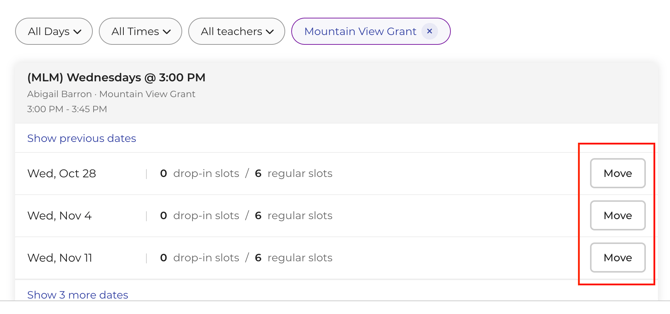
- Select Move next to the date you want, then select Confirm.
A Client moved message confirms the change, and Opus1.io updates both class rosters.
Each date in the list shows how many drop-in spots and regular spots are left, so you can see at a glance which classes have room. Some dates have no Move button:
- The original date, since the student is already leaving it.
- A date the student is already enrolled in.
- A full date, unless your role is allowed to go over a class's size limit.
How credits and charges work
Before you confirm, Opus1.io checks the group class's client cancellation policy and shows you the result on the student's card.
When a credit is allowed, the message says a service credit will be issued and used for this change. Canceling the original date creates the make-up credit, and the new date spends it straight away. The family is not charged.
When a credit is not allowed, the message explains why. The common reasons are:
- The change counts as a late cancellation, for example because it is inside your late cancellation window.
- The group class has no client cancellation policy, or no late client cancellation policy.
- The student has reached their cancellation credit limit, including a limit for a set number of days.
You can still select Confirm. The student moves, no credit is created, and the new date is not charged.
Move never opens checkout and never starts a new subscription in Opus1.io.
What stays the same
Moving a student in Opus1.io changes one date and nothing else:
- The student stays enrolled in their original class for every other date.
- Their subscription, payment plan, and invoices do not change.
- The student's history shows a cancellation on the original date and an enrollment on the new date, recorded as two separate entries.
If the student was previously canceled from the date you choose, Move puts them back on that date using the plan they already had there.
Notifications
Opus1.io sends the usual notices for both halves of the move. The family receives the standard cancellation notice for the original date and the standard enrollment notice for the new one. The teachers of both classes are notified the same way.
To move a student without sending either notice, turn on Do not notify the participants (Clients and Staff) before you select Confirm. This is useful when you have already arranged the switch with the family by phone.
When the Move button is missing
Opus1.io hides Move in these cases:
- The date is a private lesson, or a one-time event such as a workshop or recital.
- The class date itself is canceled, late canceled, on hold, or skipped because the location is closed.
- The student is already canceled, late canceled, marked no-show, completed, or on hold for that date.
- Your role cannot both enroll students and cancel a student from that class date.
Move also cannot place a student in a class from a different group class service. Pick another class in the same service, or use Transfer for an ongoing change.
Changing classes for good
When a student is switching classes from now on, use Transfer in Opus1.io instead of Move. Transfer ends the student's current group class subscription and enrolls them in the new class with a new subscription and payment, and it can move them to a different group class service. It is available only to students with a subscription that has not ended, so drop-in students can be moved but not transferred.
Transfer does not prorate or refund the current subscription's invoice, so check the new invoice before you finish. The full steps are in How do I transfer a client to another group class?
FAQ
Does a move count against the student's make-up limit?
Yes. Opus1.io treats the original date as a client cancellation, so it counts toward any cancellation credit limit on the group class, the same as if the family had canceled. When the student is already at their limit, the move still goes through without a credit and without a charge.
Can I move a student to a class with a different teacher or at another location?
Yes, as long as it is a class in the same group class service. Use the teacher and location filters on the Move client screen to find it.
Can families move themselves to another class date?
No. Move is a staff action, available to Owners, Managers, and Staff. When a family asks to switch a date, your front desk makes the move for them.
Can I move several students at once?
No. Move works one student at a time. Repeat the steps for each student.
Related Articles
- How do I transfer a client to another group class? — the ongoing version of a class change, with a new subscription
- How do I enroll my clients into group class services? — the standard way to put a student in a class
- Choosing the Right Payment Plan for your Service — the plan templates a group class can use
- Understanding Cancellation Makeup Credit Settings: Timing, Validity, and Limits — what decides whether a move earns a credit
- How do I update my services' cancellation policies? — where to set the policy Move checks
- How do I set a class size for a specific group class? — the limit that decides when a date is full