---
title: Managing Terms and Conditions Policies
description: A walkthrough of opus1.io's terms and conditions policies feature, including creating new policies, publishing policies to services, and migrating existing subscriptions to the latest policy version.
---

[Skip to content](https://kb.opus1.io/how-do-i-create-terms-and-conditions-for-my-services-v2#main-content)

English

Show submenu for translations

![Opus1-3-icon-color-1.png\]](https://kb.opus1.io/hs-fs/hubfs/Opus1-3-icon-color-1.png?height=50&name=Opus1-3-icon-color-1.png)

Open main navigation

Close main navigation

- English
  
  Show submenu for translations
- Go to opus1.io

 Go to opus1.io

 Hello. How can we help you?

- There are no suggestions because the search field is empty.

1. [opus1io Knowledge Base](https://kb.opus1.io/?hsLang=en)
2. [Business](https://kb.opus1.io/business?hsLang=en)
3. [Terms & Conditions](https://kb.opus1.io/business?hsLang=en#terms-conditions)

# Managing Terms and Conditions Policies

## A walkthrough of opus1.io's terms and conditions policies feature, including creating new policies, publishing policies to services, and migrating existing subscriptions to the latest policy version.

**Table of Contents: **

1. [**Permissions**](https://kb.opus1.io/how-do-i-create-terms-and-conditions-for-my-services-v2#Permissions)
2. [**Creating Terms and Conditions Policies**](https://kb.opus1.io/how-do-i-create-terms-and-conditions-for-my-services-v2#Creating-Terms-and-Conditions-Policies)
3. [**Publishing Terms and Conditions Policies to your Services**](https://kb.opus1.io/how-do-i-create-terms-and-conditions-for-my-services-v2#Publishing-TandC-policies)
4. [**Migrating Subscriptions to the latest Terms and Conditions Policy Version**](https://kb.opus1.io/how-do-i-create-terms-and-conditions-for-my-services-v2#Migrating-to-latest-Version)
5. [**Updating Terms and Conditions Policies**](https://kb.opus1.io/how-do-i-create-terms-and-conditions-for-my-services-v2#Updating-TandC-Policies)
6. [**Metrics**](https://kb.opus1.io/how-do-i-create-terms-and-conditions-for-my-services-v2#Metrics)


#### **Permissions**

- The Terms and Conditions Policies page is only accessible to **staff, managers, and owners.**
- **Staff have read-only access to T&C Policies**, where they may review T&C policy metrics. Additionally, they may update the T&C policy version for individual subscriptions as well as mark T&C policies as accepted/un-accepted for individual subscriptions.
- **Managers and Owners read and write access to T&C policies** and may create new T&C policies, duplicate existing T&C policies, publish policies to services, and batch-migrate pending and active subscriptions to the latest policy version (including batch prompting re-acceptance of the latest T&C policy version). They may update the T&C policy version for individual subscriptions as well as mark T&C policies as accepted/un-accepted for individual subscriptions.


#### **Creating Terms and Conditions Policies**

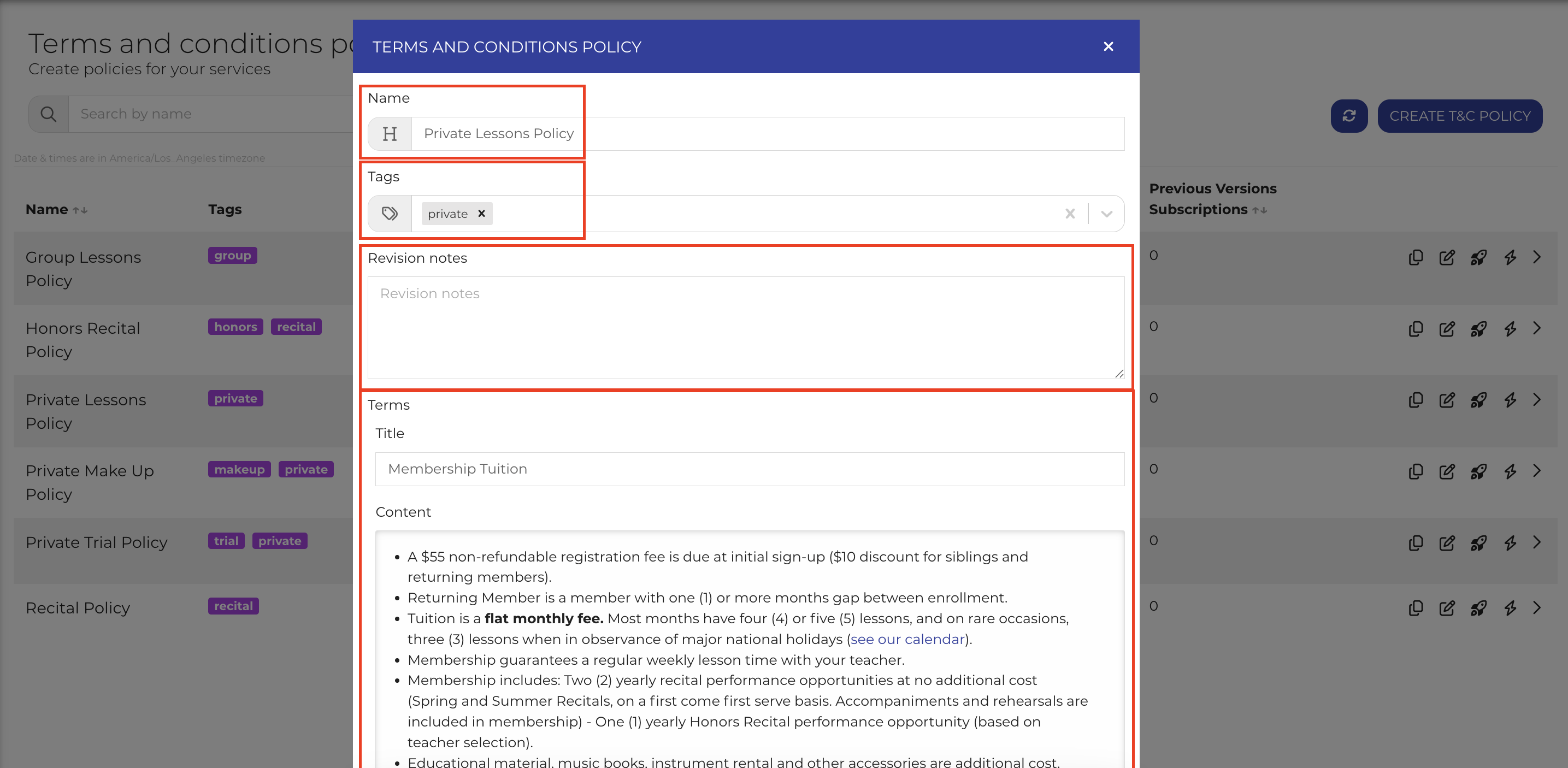
- To create a new Terms and Conditions policy, navigate to **Settings \> T&Cs Policies, **and click **CREATE T&C POLICY. **
- Here, you may give your T&C policy a **name, tags, revision notes**, and add **policy terms**, including term titles and content.![](https://kb.opus1.io/hs-fs/hubfs/Screenshot%202025-03-17%20at%2010-36-41%E2%80%AFAM-png.png?width=2870&height=1406&name=Screenshot%202025-03-17%20at%2010-36-41%E2%80%AFAM-png.png) 
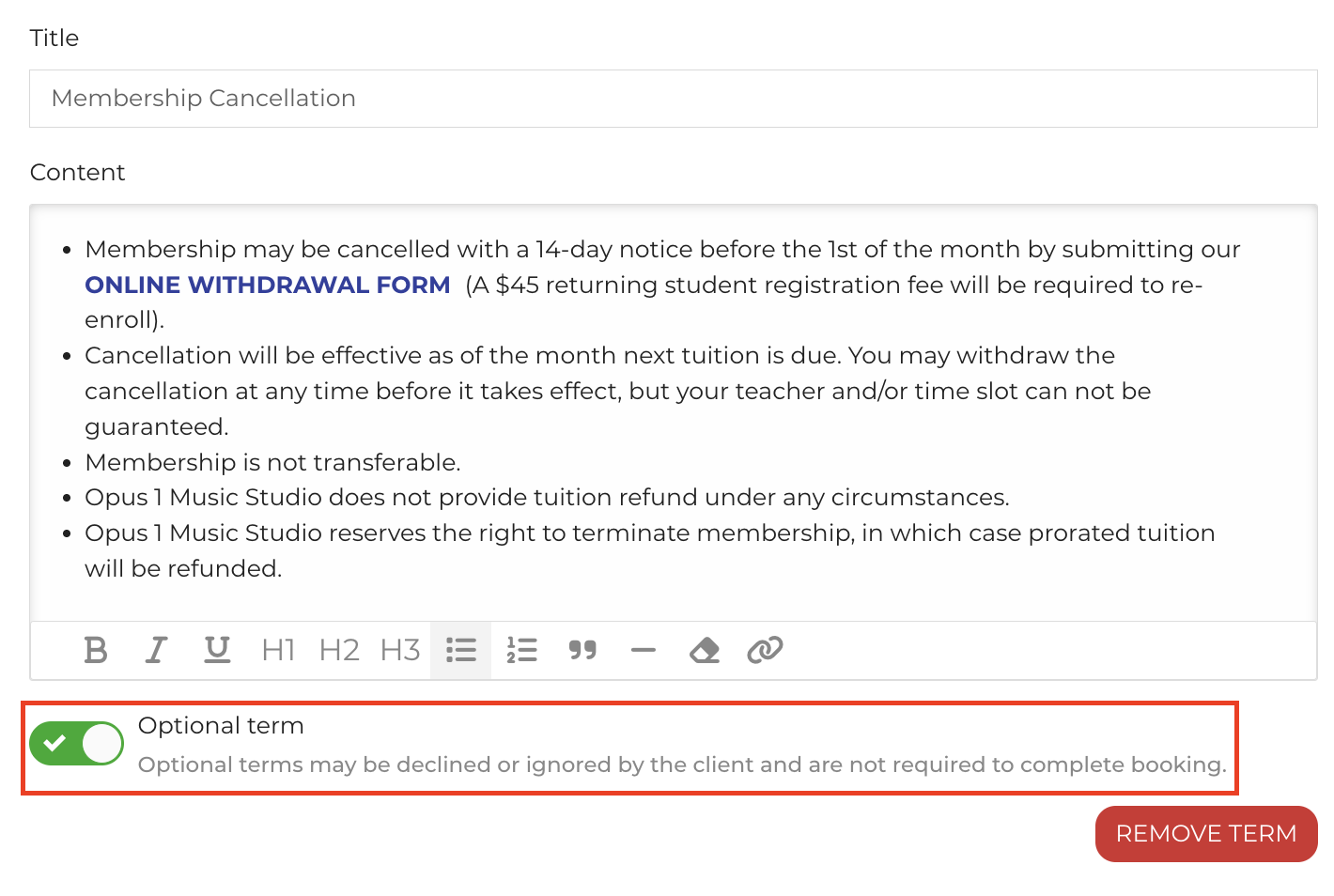
- **Optional terms** may be declined or ignored by the client and are not required to complete booking.![](https://kb.opus1.io/hs-fs/hubfs/Screenshot%202025-03-17%20at%2010-37-47%E2%80%AFAM-png.png?width=1420&height=954&name=Screenshot%202025-03-17%20at%2010-37-47%E2%80%AFAM-png.png)
- Once your new T&C Policy is complete, you may click **CREATE POLICY **to save your policy. If you wish to immediately publish your new T&C policy to your services, click **CREATE POLICY & PUBLISH.**


#### **Publishing Terms and Conditions Policies to your Services**

- **Publishing** a T&C policy means making that policy visible to clients who enroll with your services. Additionally, publishing a T&C policy to a service that was previously associated with a different T&C policy will associate subscriptions to that service with the new T&C policy. 
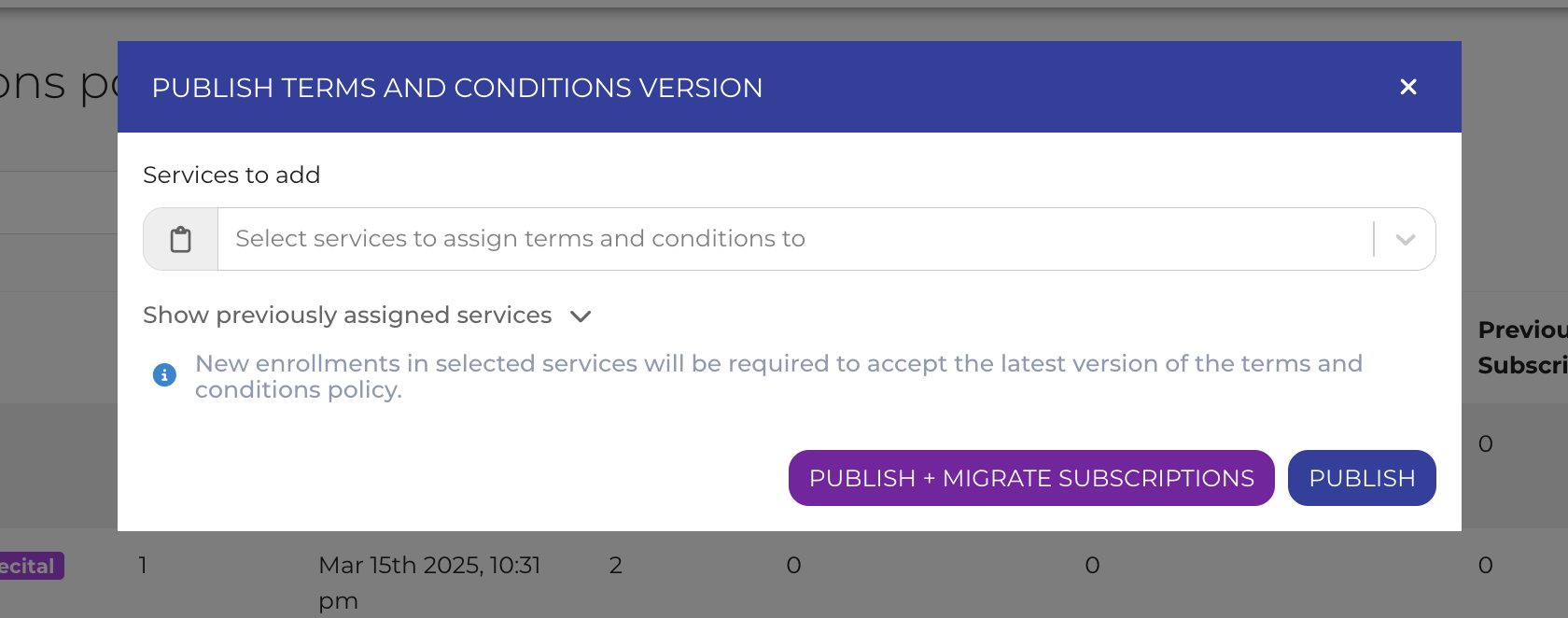
- **To publish a T&C policy to your services, **click the **Publish **button (the spaceship icon) on one of your T&C policies.
- Next, assign services to this T&C policy. Click **Show previously assigned services **to see services already associated with this T&C policy. Once completed, click **PUBLISH, **or click **PUBLISH + MIGRATE SUBSCRIPTIONS **to continue to migrate associated subscriptions to the latest T&C policy version.![](https://kb.opus1.io/hs-fs/hubfs/image-png-Mar-17-2025-03-39-22-9691-PM.png?width=1680&height=662&name=image-png-Mar-17-2025-03-39-22-9691-PM.png)


#### **Migrating Subscriptions to the latest Terms and Conditions Policy Version**

- Whenever you publish changes to a T&C policy, a new T&C policy version is created. 
- **Migrating Subscriptions means to prompt to accept the latest published version of the policy**, allowing you to easily manage client T&C acceptance when your business's policies change. 
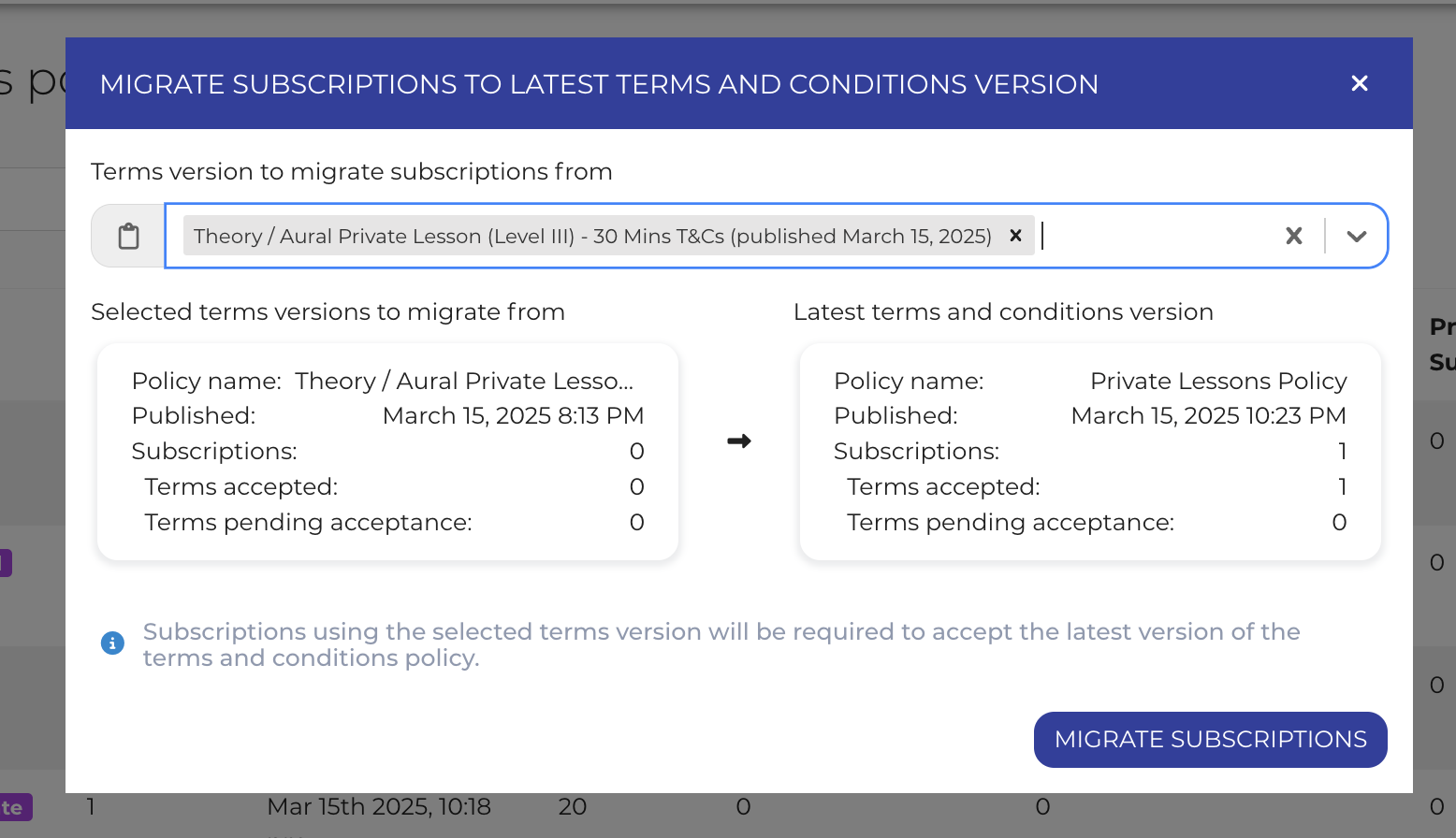
- To migrate subscriptions, click the **Migrate **button (the lightning icon).
- Next, select one or more previous T&C policy versions. Subscriptions to selected T&C versions will be migrated to the latest version of the T&C policy and prompted to re-accept the terms and conditions of your services.![](https://kb.opus1.io/hs-fs/hubfs/image-png-Mar-17-2025-03-40-04-2342-PM.png?width=1556&height=896&name=image-png-Mar-17-2025-03-40-04-2342-PM.png)


#### **Updating Terms and Conditions Policies**

- When you update your Terms and Conditions Policies, you create a new policy version. Until published to your services, this new policy version will be saved as a **Draft **version and will not be shown to clients. 
- To update an existing T&C policy, click the **Update **button (the notepad icon). Next, modify your T&C policy. We recommend including **revision notes** so you can easily remember what was changed between different T&C policy versions. 
- Once completed, you click **CREATE POLICY **to save your new T&C policy version as a **Draft** or click **CREATE POLICY & PUBLISH **to make the latest T&C policy version live for your services. 
- To duplicate existing policies, click the **Duplicate **button (the two sheets icon). This will create a new T&C policy named "Copy of \[Originating T&C Policy\]" and copy over all terms (titles & content). Revision notes are cleared when creating a new T&C policy by duplication. 


#### **Metrics**

- Opus1.io provides overall metrics for T&C policies and metrics for individual policy versions. 
- **T&C Policy Metrics ![](https://img.notionusercontent.com/s3/prod-files-secure%2F6da860e6-e0a4-4a71-8050-194d3e4e15dd%2Fa51cd0da-3c80-4f00-8c2e-b664af94f045%2FScreenshot_2025-02-21_at_11.48.12_AM.png/size/w=2000?exp=1742226285&sig=dafDUDbSNQ7HCLGwdHgCIZFsKMODGmCD7u7aNbe7gQ8)**  
    - **Versions** - the total number of created versions for a given T&C policy, including draft, live, live (locked), and discontinued versions
    - **Latest Version** - the creation date & time of the latest published version of the T&C policy
    - **Services** - the total number of services currently assigned to this T&C policy
    - **Total Subscriptions** - the total number of pending & active subscriptions whose services are currently assigned to any version of this T&C policy
    - **Latest Version Subscriptions** - the total number of pending & active subscriptions linked to the latest published version of the T&C policy
    - **Previous Versions Subscriptions** - the total number of pending & active subscriptions linked to the any previously published version of the T&C policy

- **T&C Policy Versions Metrics![](https://img.notionusercontent.com/s3/prod-files-secure%2F6da860e6-e0a4-4a71-8050-194d3e4e15dd%2Fa05767f2-160f-4b7c-b06e-312f8d9e632d%2FScreenshot_2025-02-21_at_11.48.34_AM.png/size/w=2000?exp=1742226312&sig=_NanRXTsuyxZIsPAq3ccR5HfvRLfoNbin3U_yJWHHVs)**  
    - **Created At** - the creation date & time for a given T&C policy version
    - **Published At** - the publish date & Time for a given T&C policy version
    - **Status** - the status of the version of the T&C policy. There are four version statuses: 
          - **Draft** - the default status for newly-created versions of T&C policies, the version has not yet been published for any services.
          - **Live** - a version that has been published for one or more services
          - **Live (Locked)** - a version that has been published for one or more services with at least one subscription that has accepted the T&C for that service
          - **Discontinued** - a previous version of T&C policies
    - **Services** - the total number of services linked to that version of the T&C policy
    - **Total Subscriptions** - the total number of pending & active subscriptions linked to that version of the T&C policy
    - **Accepted** - the total number of pending & active subscriptions that have accepted T&C for that version of the T&C policy
    - **Pending Acceptance** - the total number of pending & active subscriptions that have not yet accepted T&C for that version of the T&C policy

- [Account & Troubleshooting](https://kb.opus1.io/account-troubleshooting?hsLang=en#main-content)

    - [General](https://kb.opus1.io/account-troubleshooting?hsLang=en#general)
    - [Login & Access](https://kb.opus1.io/account-troubleshooting?hsLang=en#login-access)
    - [Release Notes](https://kb.opus1.io/account-troubleshooting?hsLang=en#release-notes)
- [Business](https://kb.opus1.io/business?hsLang=en#main-content)

    - [General](https://kb.opus1.io/business?hsLang=en#general)
    - [Business Profile & Billing](https://kb.opus1.io/business?hsLang=en#business-profile-billing)
    - [Client Data & Forms](https://kb.opus1.io/business?hsLang=en#client-data-forms)
    - [Integrations](https://kb.opus1.io/business?hsLang=en#integrations)
    - [Locations & Rooms](https://kb.opus1.io/business?hsLang=en#locations-rooms)
    - [Self-Booking Links](https://kb.opus1.io/business?hsLang=en#self-booking-links)
    - [Terms & Conditions](https://kb.opus1.io/business?hsLang=en#terms-conditions)
- [Calendar & Scheduling](https://kb.opus1.io/calendar-scheduling?hsLang=en#main-content)

    - [General](https://kb.opus1.io/calendar-scheduling?hsLang=en#general)
    - [Batch Schedule Actions](https://kb.opus1.io/calendar-scheduling?hsLang=en#batch-schedule-actions)
    - [Calendar Notes & Display](https://kb.opus1.io/calendar-scheduling?hsLang=en#calendar-notes-display)
    - [Enrollment](https://kb.opus1.io/calendar-scheduling?hsLang=en#enrollment)
    - [Recurring & Rescheduling](https://kb.opus1.io/calendar-scheduling?hsLang=en#recurring-rescheduling)
    - [Substitutes](https://kb.opus1.io/calendar-scheduling?hsLang=en#substitutes)
- [Clients](https://kb.opus1.io/clients?hsLang=en#main-content)

    - [Account Managers & Dependents](https://kb.opus1.io/clients?hsLang=en#account-managers-dependents)
    - [Client Experience](https://kb.opus1.io/clients?hsLang=en#client-experience)
    - [Client Records](https://kb.opus1.io/clients?hsLang=en#client-records)
    - [Credits](https://kb.opus1.io/clients?hsLang=en#credits)
    - [Gift Cards](https://kb.opus1.io/clients?hsLang=en#gift-cards)
    - [Invoices](https://kb.opus1.io/clients?hsLang=en#invoices)
    - [Payments & Auto-Pay](https://kb.opus1.io/clients?hsLang=en#payments-auto-pay)
    - [Subscriptions](https://kb.opus1.io/clients?hsLang=en#subscriptions)
    - [Waitlist Notifications](https://kb.opus1.io/clients?hsLang=en#waitlist-notifications)
- [Communication](https://kb.opus1.io/communication?hsLang=en#main-content)

    - [Email & Notifications](https://kb.opus1.io/communication?hsLang=en#email-notifications)
    - [SMS](https://kb.opus1.io/communication?hsLang=en#sms)
    - [Voice](https://kb.opus1.io/communication?hsLang=en#voice)
- [Grow Your Music School](https://kb.opus1.io/grow-your-music-school?hsLang=en#main-content)

    - [Convert Prospects](https://kb.opus1.io/grow-your-music-school?hsLang=en#convert-prospects)
    - [Email Campaigns](https://kb.opus1.io/grow-your-music-school?hsLang=en#email-campaigns)
    - [Get Found & Capture Leads](https://kb.opus1.io/grow-your-music-school?hsLang=en#get-found-capture-leads)
    - [Reviews & Reputation](https://kb.opus1.io/grow-your-music-school?hsLang=en#reviews-reputation)
- [Payment Processing](https://kb.opus1.io/payment-processing?hsLang=en#main-content)

    - [General](https://kb.opus1.io/payment-processing?hsLang=en#general)
    - [Opus1 Payments (Stripe)](https://kb.opus1.io/payment-processing?hsLang=en#opus1-payments-stripe)
    - [Clover Connect (FiServ / Cardpointe)](https://kb.opus1.io/payment-processing?hsLang=en#clover-connect-fiserv-cardpointe)
- [Reporting](https://kb.opus1.io/reporting?hsLang=en#main-content)

    - [Attendance](https://kb.opus1.io/reporting?hsLang=en#attendance)
    - [Credits](https://kb.opus1.io/reporting?hsLang=en#credits)
    - [Invoices](https://kb.opus1.io/reporting?hsLang=en#invoices)
    - [Subscriptions](https://kb.opus1.io/reporting?hsLang=en#subscriptions)
    - [Transactions](https://kb.opus1.io/reporting?hsLang=en#transactions)
    - [Data Exports](https://kb.opus1.io/reporting?hsLang=en#data-exports)
- [Services](https://kb.opus1.io/services?hsLang=en#main-content)

    - [Appointments](https://kb.opus1.io/services?hsLang=en#appointments)
    - [Building Services](https://kb.opus1.io/services?hsLang=en#building-services)
    - [Cancellation](https://kb.opus1.io/services?hsLang=en#cancellation)
    - [Events](https://kb.opus1.io/services?hsLang=en#events)
    - [Optimization & Conversion](https://kb.opus1.io/services?hsLang=en#optimization-conversion)
    - [Payment Plans](https://kb.opus1.io/services?hsLang=en#payment-plans)
    - [Sessions](https://kb.opus1.io/services?hsLang=en#sessions)
    - [Subscription-Only](https://kb.opus1.io/services?hsLang=en#subscription-only)
- [Staff](https://kb.opus1.io/staff?hsLang=en#main-content)

    - [Availability & Self-Booking](https://kb.opus1.io/staff?hsLang=en#availability-self-booking)
    - [Calendar Sync](https://kb.opus1.io/staff?hsLang=en#calendar-sync)
    - [Onboarding & Offboarding](https://kb.opus1.io/staff?hsLang=en#onboarding-offboarding)
    - [Payroll & Compensation](https://kb.opus1.io/staff?hsLang=en#payroll-compensation)
    - [Roles & Permissions](https://kb.opus1.io/staff?hsLang=en#roles-permissions)
    - [Teacher Tools & Access](https://kb.opus1.io/staff?hsLang=en#teacher-tools-access)
    - [Time-off](https://kb.opus1.io/staff?hsLang=en#time-off)
- [Stats](https://kb.opus1.io/stats?hsLang=en#main-content)

    - [Conversions](https://kb.opus1.io/stats?hsLang=en#conversions)
    - [Client Metrics](https://kb.opus1.io/stats?hsLang=en#client-metrics)
    - [Dashboard](https://kb.opus1.io/stats?hsLang=en#dashboard)
    - [Session Enrollment](https://kb.opus1.io/stats?hsLang=en#session-enrollment)
    - [Today](https://kb.opus1.io/stats?hsLang=en#today)
    - [Utilization](https://kb.opus1.io/stats?hsLang=en#utilization)

[![Chill listening crop-3](https://kb.opus1.io/hs-fs/hubfs/Opus1-3-icon-color-2.png?width=35&height=24&name=Opus1-3-icon-color-2.png "Chill listening crop-3")](http://opus1.io)

<https://www.facebook.com/opus1.io/>

Copyright © 2025, Opus1.io