![Opus1-3-icon-color-1.png]](https://kb.opus1.io/hs-fs/hubfs/Opus1-3-icon-color-1.png?height=50&name=Opus1-3-icon-color-1.png)
Applies to: Owner, Manager, Staff
PLUS Feature: No
Plan: All
Last updated: October 21, 2026
Table of Contents
Overview
In Opus1.io, the sign-up fee and the lesson plan are two separate charges, and every discount targets exactly one of them. The Apply To setting decides which. Plan reduces lessons or tuition. Signup reduces the one-time sign-up fee, and registration fees use the same Signup setting.
Why it matters: a family who was promised 20% off lessons, but got 20% off a $40 sign-up fee instead, sees full tuition on their first invoice and again the month after. Catching it before checkout saves an awkward conversation and a manual adjustment later.
How to tell which charge was discounted
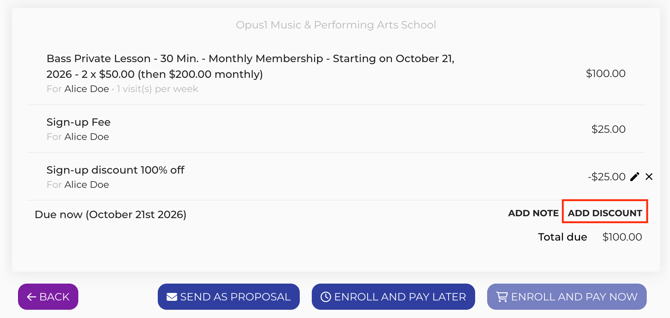
Open the invoice and read the discount line. Opus1.io names the line after the charge it reduced.
|
Invoice line reads |
What it reduced |
Repeats on later invoices? |
|---|---|---|
|
Sign-up discount or Sign-up discount 20% off |
The sign-up or registration fee |
No |
|
Sign-up fee discount - Fall trial offer |
The sign-up fee, from a promotion |
No |
|
Monthly Tuition discount |
The lesson plan |
Only if it was set to recur |
|
Monthly Tuition promo discount - Fall trial offer |
The lesson plan, from a promotion |
No |
|
Sibling discount or Household discount |
The lesson plan |
Yes, while the sibling rule applies |
In the table, Monthly Tuition stands for your plan's name and Fall trial offer for your promotion's title.
If the tuition line still shows the full plan price and the only discount line starts with Sign-up, the discount went to the sign-up fee.
Sibling and household discounts are a separate setting on the payment plan. They always reduce the plan charge, so a line that reads Sign-up discount came from a discount someone added by hand, a preset, or a promotion.
Why the discount landed on the sign-up fee
Apply To was set to Signup
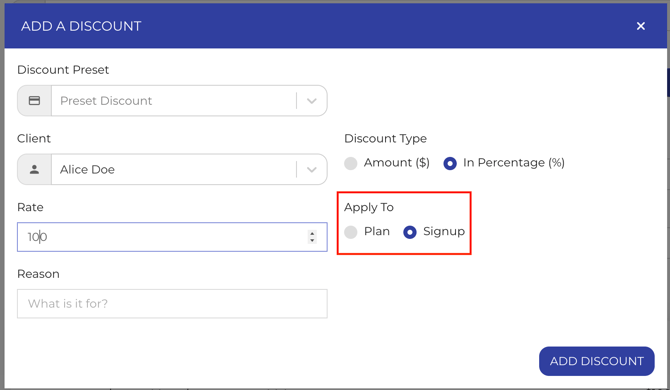
When you book a lesson or enroll a student in a group class, the payment step has an Add Discount button. The discount window includes Apply To, with Plan and Signup as choices.
If you click Add Discount from the sign-up fee row, or from the registration fee row, Opus1.io starts Apply To on Signup. It is easy to enter the amount and save without noticing.
A preset was saved with Signup
A preset discount keeps its own Apply To value. Choosing a preset that was saved as Signup fills that in for you. Presets can also be set to Plan, or to Shopping Cart, which is used when taking a payment and is separate from Plan and Signup.
The promotion only had a sign-up amount
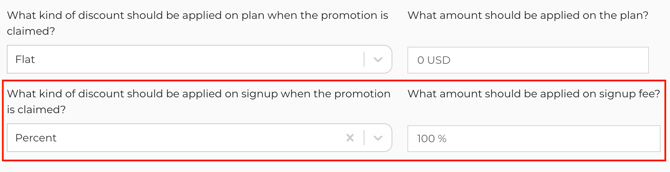
A promotion carries two discounts that stand on their own: one for the plan and one for the sign-up fee. A promotion with $0 on the plan and $25 on the sign-up fee only reduces the sign-up fee. Promotion discounts of either kind apply once, on the enrollment invoice.
A sign-up discount is charged once
A Signup discount lives on the invoice that includes the sign-up fee. Since the sign-up fee is not charged again, neither is the discount, and next month's invoice is the full plan price.
A flat amount cannot spill over onto tuition
A dollar discount is capped at the charge it targets. A $100 Signup discount on a $40 sign-up fee brings the fee to $0, and the other $60 goes unused rather than moving to tuition. A percentage works the same way: 25% off a $40 sign-up fee is $10, and a $160 plan stays $160.
How to fix it
Which fix to use depends on where the discount came from and whether the family has already checked out. Before checkout you can still change the discount itself. Once Opus1.io has created the invoice, its sign-up discount stays as charged, so the fix is to add a plan discount going forward.
Before the family checks out
-
Open the discount on the payment step.
-
Set Apply To to Plan if the discount should reduce lessons or tuition.
-
Add a second discount with Apply To set to Signup if you also want to reduce the sign-up fee.
-
If the discount should repeat on later invoices, set Recurring to Yes.
-
If a preset is the cause, enter the plan discount by hand for now, then fix the preset under Business > General > Business Settings by editing it and setting Apply To to Plan.
Editing a preset only changes what happens the next time someone picks it. Invoices that already used it keep the Signup discount.
When a promotion is the cause
-
Go to Settings > Promotions and open the promotion.
-
Enter the discount you want in the plan discount field.
-
Leave a sign-up discount only if the sign-up fee should be reduced too.
-
Save.
The next enrollment that uses the promotion gets both amounts. An invoice that already exists keeps the amounts it was created with.
When the student is already enrolled
The sign-up discount stays on the first invoice as it was charged. To discount tuition from here on, open the student's subscription, click Update, turn on Discount, and enter the plan discount. Discounts added on the subscription recur by default.
Open, unpaid invoices from that subscription pick up the new discount. A paid invoice keeps its original total, so if the family already paid full tuition, record the difference with a monetary credit or your usual balance adjustment.
If the subscription is on hold, add the plan discount after the hold ends.
Example: a $160 monthly plan with a $40 sign-up fee
|
Charge |
Price |
What was discounted |
Family pays |
|---|---|---|---|
|
Guitar monthly plan |
$160 |
Nothing |
$160 |
|
Sign-up fee |
$40 |
50% with Apply To set to Signup |
$20 |
|
First invoice total |
$180 |
||
|
Next month |
$160 |
No sign-up fee, and no plan discount |
$160 |
To discount tuition as well, add a Plan discount in Opus1.io. A 50% Plan discount takes $80 off the $160 plan, and a recurring one does the same each month. The sign-up fee is still only reduced by the Signup discount.
FAQ
Can one discount cover both the sign-up fee and tuition?
No. Each discount in Opus1.io targets one charge. Add two discounts, one with Apply To set to Plan and one set to Signup.
Why did the promotion discount disappear in month two?
Promotions apply to the enrollment invoice only. To keep a discount on later tuition, add a recurring discount to the student's subscription.
Does fixing the preset or promotion change invoices that already exist?
No. The change applies to the next booking or enrollment that uses it. For a student who is already enrolled, add the plan discount on their subscription.
Do sibling discounts ever land on the sign-up fee?
No. Sibling and household discounts are set on the payment plan and only reduce the plan charge.
Related Articles
-
How do I add a recurring discount to a subscription? — add a tuition discount at enrollment or to an existing subscription
-
How do I create preset discounts? — set up the discounts your front desk picks at checkout
-
Using Promotional Links — create promotions and set their plan and sign-up amounts
-
How do I enable sibling discounts? — the separate setting for families with more than one student
-
How do I add a discount to an invoice? — a one-off discount on a single invoice
-
How do I add monetary credits to a client's account? — make up the difference on an invoice that is already paid