![Opus1-3-icon-color-1.png]](https://kb.opus1.io/hs-fs/hubfs/Opus1-3-icon-color-1.png?height=50&name=Opus1-3-icon-color-1.png)
Applies to: Owner, Manager, Staff
PLUS Feature: No
Plan: Requires SMS
Last updated: October 10, 2026
Table of Contents
- Overview
- Who can see and resend a failed text
- How to spot a failed text
- How to send the message again
- What happens after you resend
- Why a text fails, and what to check first
- Failed is not the same as Closed
- FAQ
- Related Articles
Overview
Your front desk texts a parent that today's lesson is cancelled for snow. The text never leaves the building. Nobody notices, because the conversation looks like every other conversation in the inbox — and now a nine-year-old is standing outside a locked studio.
That is the gap Opus1.io closes by marking failed sends in the conversation. A text that did not reach the phone company is flagged on the conversation row in the list, so you can spot it while scanning, and the message itself carries a failed status inside the conversation, so you can see exactly which one it was.
Why: The studio catches a missed message in the same inbox it already uses for every other family text, and sends it again from the studio number — so the history stays in one place and nobody has to reconstruct the wording from memory or fall back to a personal phone.
ℹ️ Note: Opus1.io never resends a failed one-to-one text on its own. A failed text waits until someone on staff sends it again. This article covers one-to-one texts in Instant Messaging, not Batch SMS or a text to a whole class.
Who can see and resend a failed text
There is no separate "resend" permission in Opus1.io. Anyone who can open Instant Messaging and send a one-to-one text can send a failed one again, and owners do not switch anything on in Business Settings to allow it.
| Role | Open Instant Messaging | See the failed message | Send it again |
|---|---|---|---|
| Owner | Yes | Yes | Yes |
| Manager | Yes | Yes | Yes |
| Staff / Teacher | Yes | Yes | Yes |
| Limited Staff | No | No | No |
| Client (family) | No | No | No |
Why it matters: Everyone who texts families can fix a failure themselves. No one has to ask an owner to look, and there's no escalation or waiting.
Staff see the full inbox for the selected studio SMS number, not only their own students. Families never see Instant Messaging at all — they text your studio number from their own phones, so they see no failure marking and no resend option. From the family's side, a failed text simply never arrived.
How to spot a failed text
Opus1.io shows a failed send in two places. Use the conversation list to find it; open the conversation to act on it.
In the conversation list
When the most recent message on a conversation failed, that row carries a warning color alongside the usual name, message preview, and timestamp. Hovering it tells you the message failed to send and why.
The marker is a scan target, nothing more — clicking it does not send the text again. Click the row to open the conversation.
Two things it does not mean:
- The family opted out. That is marked separately on the row.
- The conversation is Closed. Closed is a status your staff set by hand. A failed send re-opens the conversation.
If a later message on the same conversation goes out successfully, the row stops showing the warning, because the marker only ever reflects the most recent message.
Inside the conversation
Open the conversation and find the message itself. A failed outbound text keeps its original wording and any attached image, and is marked failed in the footer next to the sender and time. Where Opus1.io received a reason from the phone company — an invalid or unassigned number, for example — hovering the warning icon shows it.
Only outbound texts from your studio can fail this way. Messages the family sent to you are already delivered by definition, so they never carry this marking.
How to send the message again
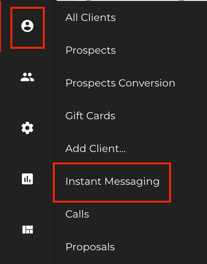
- Go to Clients > Instant Messaging.
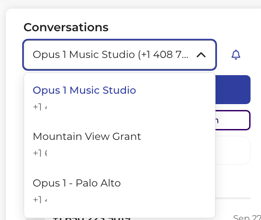
- If your school runs a separate SMS number per location, check that the right number is selected. Conversations belong to the number currently in view.
- Find the conversation with the warning marker and click it.
- Read the failure reason on the failed message, if one is shown, and fix the underlying problem first.
- Click Retry sending message next to the message
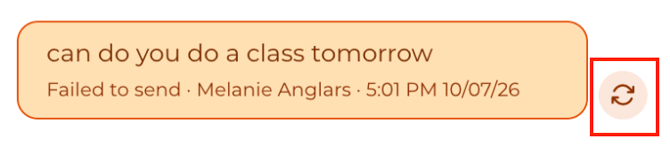
This sends a new text. It does not edit or replace the failed one, which stays in the conversation as history — Opus1.io does not delete sent messages.
Opus1.io will not send an empty message, a message over 2,000 characters, or a message to a family who has opted out of studio texts; in each case the composer tells you why rather than sending.
⚠️ Warning: A confirmation that the message sent means Opus1.io handed it to the phone company. It does not mean the phone in the family's pocket buzzed. Delivery can still fail afterwards, which shows up as a new failed message.
What happens after you resend
The new message updates its own status in place as it moves, so there is no need to refresh Instant Messaging to watch it.
| Moment | What your staff see | What the family sees |
|---|---|---|
| Before you resend | Warning on the row, failed message in the conversation | Nothing — the first attempt never arrived |
| Sending | The new message is in progress | Nothing yet |
| It works | The new message moves to sent, then delivered once the phone company confirms | The text arrives |
| It fails again | The new message is marked failed, and the row shows the warning again | Still nothing |
The original failed message stays where it is throughout. You now have two messages in the conversation: the one that did not go out, and the one that did.
Why a text fails, and what to check first
Sending the same text a second time only helps if the first failure was a one-off. Most are not. Work through these before you resend, or you will simply collect a second failed message.
The number cannot receive texts. A landline, a disconnected number, or a typo in the profile will fail every time. Check the number on the client's profile and correct it there first.
The family opted out. If someone replied STOP or asked to be removed from studio texts, Opus1.io blocks the composer for that family. Sending again will not get around it — they have to opt back in. Reach them by email or phone instead.
The phone company filtered it. AT&T, Verizon, T-Mobile and the rest can quietly block a message they read as spam, and a filtered message may never reach the family even when everything on your side looks correct. The usual triggers:
- Your business registration is not finished. Before a new studio is verified with The Campaign Registry — a ledger the major phone companies maintain of legitimate businesses — large batches of texts may be filtered. Verification takes roughly 5 business days after Opus1.io enables SMS for you.
- A public link shortener. Links shortened through a public service are a strong spam signal to phone companies. Use the shortener built into Opus1.io instead.
- A daily cap. T-Mobile, for instance, allows around 2,000 segments per day per registered number. Phone companies bill texts in 160-character segments, so a long message to a long list burns through that faster than the message count suggests.
💡 Tip: If the same family's texts fail repeatedly while everyone else's go through, the problem is almost always their number rather than your studio. Confirm it with them directly before sending a fourth attempt.
Failed is not the same as Closed
A failed text is a delivery problem. Active and Closed are something different — they describe where a conversation stands in your workflow, and your staff set them by hand.
A conversation can be Closed and still contain a failed message, and a conversation can be wide open with everything delivered. Sending a message on a Closed conversation — including a resend — makes it Active again, which is expected behavior rather than something to undo.
The Show Active Only filter hides Closed conversations from the list. It does not hide or resolve failed messages.
FAQ
Does Opus1.io resend a failed text on its own? No. A failed one-to-one text stays failed until someone on staff opens the conversation and sends it again.
Opus1.io says the message sent, but the family says they never got it. Sent means the phone company accepted the message from Opus1.io, not that it reached the handset. The most common cause is filtering — check whether your business registration with The Campaign Registry has finished, whether the message contained a public link shortener, and whether the number on file is a mobile that can receive texts.
Can I delete or unsend the failed message? No. Texts sent through Opus1.io cannot be deleted, and the failed one stays in the conversation as a record of the attempt. A resend is a separate, new message.
The conversation is Closed. Can I still send the message again? Yes. Open it and send as usual. Sending on a Closed conversation moves it back to Active.
Can Limited Staff or families resend a failed text? No. Neither can open Instant Messaging. Families text your studio number from their own phones and never see failure markings.
Related Articles
- What is the difference between Read/Unread and Active/Closed conversations? — how Opus1.io tracks the state of a conversation, and why that is separate from whether a message was delivered
- How do I mark SMS conversations as closed? — closing a conversation you are finished with, and what reopens it
- SMS: Frequently Asked Questions — enabling SMS, which numbers are eligible, and how monthly limits are counted
- Batch SMS Best Practices — segments, encoding, and carrier limits that cause filtering
- Using the URL Shortener on Opus1.io — the shortener to use so links do not get your texts blocked