![Opus1-3-icon-color-1.png]](https://kb.opus1.io/hs-fs/hubfs/Opus1-3-icon-color-1.png?height=50&name=Opus1-3-icon-color-1.png)
Applies to: Owner, Manager
PLUS Feature: No
Plan: All
Last updated: October 23, 2026
Table of Contents
- Overview
- Studio closures and teacher time off are counted differently
- How Opus1 checks a weekly lesson time
- The three conflict tolerance settings
- Settings that keep weekly lessons bookable through vacation season
- What happens after a family books across time off
- Other reasons a weekly time is missing
- How to find out why one time is missing
- Holiday season checklist
- FAQ
- Related Articles
Overview
In the weeks before Thanksgiving, winter break, or spring break, a family trying to start weekly lessons can find an empty booking page even though the teacher has open hours. Opus1 is not only asking whether the teacher is free on the first date. It is asking whether the teacher is free on that same weekday and time for roughly the next three months, and how many missed weeks your studio is willing to accept.
That allowance is called conflict tolerance: the number of future weeks, on the student's day and time, where the teacher is away or already teaching, that Opus1 will accept before it stops offering the time. Each service sets its own.
Why: Getting these settings right is the difference between a teacher who stays bookable through vacation season and one who silently disappears from your booking page for a month. Families who cannot find a time do not usually call. They go elsewhere.
This article is for owners and managers setting up weekly self-booking ahead of a holiday season.
Studio closures and teacher time off are counted differently
"Holiday" can mean two different things in Opus1, and they are set up in different places. One of them affects which weekly times families see. The other does not.
| What is blocking that week | Where it is set | Counts as a conflict? | What happens to that week of a new weekly lesson |
|---|---|---|---|
| Location closure: the studio or that location is shut for Christmas week, a public holiday, or a studio break | The location, under Closed Hours / Days | No | Skipped. No lesson takes place, it does not appear on the family's upcoming schedule, and no reminder is sent. The other weeks are unaffected. |
| Teacher time off: a vacation, sick leave, or a block on that teacher's calendar | A time off request, or a block on the teacher's availability | Yes, one conflict for each week it lands on the student's day and time | If the series is still within tolerance, the lesson is booked as normal during the time off. Your studio substitutes, moves, or cancels it. |
| Another lesson already at that time: a trial, a makeup, or a one-off | The calendar | Yes, counted the same as time off | If the series is still within tolerance, the new weekly lesson is booked into that slot too. This is uncommon, because most studios allow few near-term conflicts, but it can happen. |
| The teacher has no open hours then for that service and location | The teacher's availability | Yes | Counted the same as time off. |
A conflict is a week where that student's weekday and time collides. A teacher who is away on a Wednesday can still take a Monday student. A two-week vacation often hits the same weekday twice, and that is two conflicts, not one.
A location closure on its own never hides a weekly time. The catch is when the same dates are also blocked on the teacher. Many teachers submit time off for the holiday week even though the studio is already closed, and those time off entries do count. That is the most common reason a booking page goes blank in December even though the closure itself would not have done it.
💡 Tip: Put studio-wide holidays on the location, not on every teacher. A closure skips the week without using up any conflict tolerance. Setup steps are in How do I ensure that lessons are not booked on holidays when my studio is closed?
How Opus1 checks a weekly lesson time
When a family picks a weekly time on your booking page, Opus1 works through four steps.
- It only offers a first lesson inside the service's booking window: no sooner than the minimum and no later than the maximum, both counted from today. The first lesson itself has to be a time the teacher is free. A start date where the teacher is away or already teaching is never offered.
- From that first lesson, Opus1 looks 90 days ahead on the same weekday and time and counts the conflicts.
- It splits those 90 days into a short term and a long term, and compares each count with the limit you set for it. If either count is over its limit, Opus1 hides that start date for that time. The family is not told which limit failed.
- If the series passes, Opus1 books the future lessons. Weeks when the location is closed are skipped. Weeks that collide with time off or another lesson are booked as normal and left for your studio to resolve.
Self-booking always skips weeks when the location is closed. When staff book a weekly lesson from the calendar, leave Skip booking when location is not available on so closed weeks are skipped there too. It is on by default.
The three conflict tolerance settings
These settings live on each weekly lesson service.
- Go to Services, find the service, and click Update.
- On the General tab, open the Calendar section.
- Turn on Advanced settings.
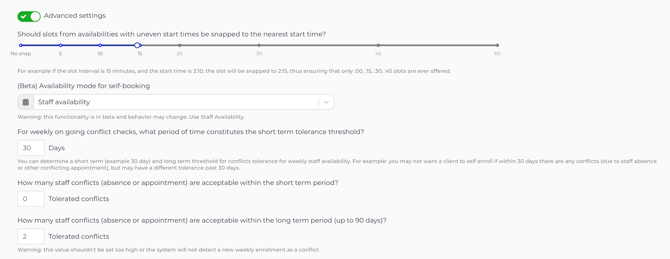
| Setting, as labeled in Opus1 | What it controls | Why it matters |
|---|---|---|
| For weekly on going conflict checks, what period of time constitutes the short term tolerance threshold? | How many days, counted from the first lesson, make up the short term. Everything after it, up to day 90, is the long term. | The longer it is, the sooner an upcoming vacation starts hiding the teacher. |
| How many staff conflicts (absence or appointment) are acceptable within the short term period? | How many conflicting weeks Opus1 accepts in the short term. | Keeps a new student's first lessons with their own teacher. |
| How many staff conflicts (absence or appointment) are acceptable within the long term period (up to 90 days)? | How many conflicting weeks Opus1 accepts after the short term. | Decides whether a vacation next month still leaves the teacher bookable. |
The short term starts at 30 days, with 0 conflicts allowed in it. With the short-term allowance at 0, one conflicting week inside the short term hides every start date that can see it, including the weeks the teacher is actually in the studio.
The two counts are checked separately. Allowing three conflicts in the long term does not help when two conflicts fall inside a short term that allows one.
Opus1 warns in the long-term field that a very high number stops a new weekly lesson from being treated as a conflict at all. Set it high enough to cover vacations you have already approved, and low enough that a teacher who is away most weeks does not still look bookable.
Example: a Thanksgiving vacation hides a teacher's Mondays
Today is Friday, October 23. The piano service lets families book up to 30 days ahead, allows one conflict in the first 30 days, and three after that. One teacher is away November 14–29, which covers Monday, November 16 and Monday, November 23.
- A Monday start on October 26, November 2, or November 9 puts both vacation Mondays inside the first 30 days. Two conflicts is over the limit of one, so the time is hidden.
- November 16 and 23 cannot be first lessons, because the teacher is away.
- The first Monday after the trip, November 30, is 38 days out, past the 30-day booking window.
Monday disappears from that teacher's booking page for the rest of the month, including the Mondays that teacher is teaching. The studio's Christmas closure in December plays no part. The teacher's time off does.
Settings that keep weekly lessons bookable through vacation season
The short term exists so a new student's first few lessons in Opus1 are clean: with their teacher, on the day the family was shown. It does not need to be 30 days to do that job.
For a year-round studio whose teachers take vacation, this split works well:
- Short-term window: 14 days
- Conflicts allowed in the short term: 0
- Conflicts allowed from day 15 to day 90: enough to cover time off already on the calendar, often 3 or more
Why: A new student's first two weeks stay clear, and a vacation three weeks out no longer hides the teacher. The lessons that land on the vacation are booked, and your studio handles them before the date arrives.
In the Thanksgiving example above, this setting brings Monday, October 26 back: both vacation Mondays now fall in the long term, and two is within three. Starts closer to the trip, such as November 9, stay hidden, because the vacation lands in their first two weeks.
These numbers are studio policy, and there is no single correct set. If the front desk is seeing more booked-over-vacation lessons than it can keep up with, lengthen the short term. Keep the short-term allowance at 0 if a brand-new student should never meet a conflict in their first weeks. Raising it to let the holidays through also allows a conflict next week.
⚠️ Warning: Lengthening the booking window is not the fix for a tolerance problem. A longer window lets families start after a vacation, but it also lets them reserve times that far ahead, and the weekly check still runs from whichever start date they pick. Adjust conflict tolerance first. Change the window only when you want families to start further out on purpose, such as January lessons booked in November.
What happens after a family books across time off
Opus1 does not show the family which weeks will be interrupted, and your studio is not notified when a series is booked with a tolerated conflict. Plan to find and resolve those weeks yourself.
Lessons during teacher time off stay on the calendar until your studio changes them. Assign a substitute, move the lesson, or cancel it. Canceling as staff follows the service's staff cancellation policy, so if that policy issues a makeup credit, the credit is created when you cancel. Booking across time off does not create one on its own.
New time off. Approve vacations through the time off request. The request lists the lessons already on the calendar that overlap it, so resolve those before you approve.
Time off you approved earlier. The request does not reappear when a new family books into those dates later. While several teachers are away, check their calendars once a week for lessons sitting inside approved time off, and substitute, move, or cancel each one.
Closed weeks. No lesson takes place and there is no reminder. A flat monthly membership is the same amount whether or not the month has a closure. A per-lesson plan bills only the lessons that take place. For lessons that were booked before you added the closure, see Why are lessons still scheduled on my closed dates?
Other reasons a weekly time is missing
If conflict tolerance is not the cause, one of these Opus1 settings usually is.
The service is set to offer makeup times only
On the service, under Calendar and Advanced settings, (Beta) Availability mode for self-booking must be Staff availability for weekly lessons booked into a teacher's normal hours.
Staff availability but only on canceled / late canceled appointments is meant for makeup services. It only offers times that a cancellation has just opened, so a weekly service set this way looks closed even when the teacher is free. This often happens when a membership service is duplicated from a makeup service. Change it back to Staff availability. You can update this setting across many services at once with batch update.
The booking window ends before the first open week
The maximum self-booking limit is counted from today and does not stretch around a closure or a vacation. If the first week a teacher is free falls past the maximum, families cannot reach it. See Why can my clients only book a few weeks ahead?
Schedule optimization is trimming times within a day
Schedule optimization strategy, Enforce schedule optimization for self-booking, and Max scheduling gap run after the conflict tolerance check. They only change which clock times appear on a day that has already passed it. For example, if a teacher's next lesson is at 5:00 PM and the max gap is 30 minutes, a new 30-minute lesson can start at 4:00 PM but not at 3:00 PM. That makes a day look sparse. It does not blank out weeks. See Schedule Optimization.
The room is the problem
A time can still appear when the only problem is a shared room, and the family is told the room is unavailable when they choose it. A teacher with their own room never runs into this, and it is not what empties a calendar before a holiday.
How to find out why one time is missing
Opus1 self-booking does not explain why a time is hidden. Staff booking does.
- Start a staff booking for the same service, location, teacher, weekday, time, and start date the family wanted.
- Read the conflict warnings. Each one is a week the self-booking check counted against the series.
- Count how many warnings fall inside the short term and how many fall after it, then compare both counts with the limits on the service.
- Check the teacher for time off on top of any location closure. The closure alone leaves the time bookable. Time off on the same dates can remove it.
If the counts are within your limits and the time is still missing, check the availability mode and the booking window, as described in Other reasons a weekly time is missing.
Holiday season checklist
On each weekly lesson service families self-book in Opus1:
- (Beta) Availability mode for self-booking is Staff availability.
- The short-term window covers the stretch you want kept clear. Fourteen days keeps a new student's first lessons clean and lets later vacations through. Thirty days is stricter and hides more teachers as vacations come into range.
- The short-term allowance is 0 if a new student's first weeks must be conflict-free.
- The long-term allowance covers the teacher time off you have already approved for the next 90 days.
- The maximum self-booking limit still reaches the first week you want new students to start.
- Studio-wide holidays are on the location under Closed Hours / Days, not only on each teacher.
- New teacher vacations go through a time off request, and the lessons it lists are resolved before you approve it.
- While time off is heavy, someone checks those teachers' calendars weekly for lessons inside approved time off.
FAQ
Can staff still book a weekly time that self-booking is hiding?
Yes. When staff book from the Opus1 calendar, conflicts show as warnings that staff can override, so the front desk can enroll a student into a time the booking page will not offer. The tolerated weeks are booked as normal and still need a substitute, a move, or a cancellation.
Why does the main schedule show a weekly opening that the booking page doesn't?
The Opus1 main schedule has two views of openings. Recurring availability looks 90 days ahead and applies your conflict tolerance, the same as self-booking. The future openings view looks 120 days ahead and does not apply conflict tolerance, so it can show a time the booking page hides.
Will changing conflict tolerance move lessons that are already booked?
No. Conflict tolerance only changes which weekly times Opus1 offers on new bookings. Lessons already on the calendar stay where they are.
Do trials and makeup lessons use conflict tolerance?
No. Opus1 only runs the weekly conflict check on services booked as a weekly series. A trial or a makeup is a single lesson, so it only needs the teacher to be free at that one time.
Related Articles
- Why can my clients only book a few weeks ahead? — the booking window, and what to change when families need to start further out
- Why isn't a teacher showing as available for self-booking? — when a teacher is missing from the booking page entirely, not just on certain weeks
- How do I ensure that lessons are not booked on holidays when my studio is closed? — adding closures to a location
- Why are lessons still scheduled on my closed dates? — closing lessons that were booked before the closure, and what it does to billing and payroll
- Making & Managing Time-Off Requests — how teachers request time off and how owners approve it
- How do I assign a substitute for another teacher's daily schedule? — covering a teacher's lessons while they are away