![Opus1-3-icon-color-1.png]](https://kb.opus1.io/hs-fs/hubfs/Opus1-3-icon-color-1.png?height=50&name=Opus1-3-icon-color-1.png)
Table of Contents
- Why connect Opus1 Payments
- Before you begin
- How to connect your account
- Setup by business type
- What Stripe will ask for
- FAQ
- Related Articles
Why Connect Opus1 Payments
Without Opus1 Payments, your front desk is the payment processor — collecting checks, logging cash, chasing overdue balances, and manually reconciling everything. Connecting Opus1 Payments moves that work off your plate:
- Families pay online at enrollment, from the portal, or on autopay
- Payments post to the right account automatically
- You get a full payment history, receipts, and reporting in one place
Opus1 Payments runs on Stripe, a regulated payment processor used by millions of businesses. Stripe handles PCI compliance, fraud monitoring, and payouts to your bank account. You don't need a separate Stripe account — this setup creates one linked to your Opus1.io studio.
ℹ️ Note: During setup, you'll be redirected from Opus1.io to Stripe's website to create your account, then returned to Opus1.io when finished. This is expected — Stripe hosts the onboarding flow directly to keep your financial information secure.
Before you begin
Have the following ready before you start. Stripe will ask for all of it, and stopping mid-flow to look things up can cause the session to time out.
- EIN (Employer Identification Number) — or your Social Security Number if you use it for business tax purposes
- Legal business name exactly as it appears on your IRS documents (your Letter 147C or SS-4 Confirmation Letter)
- Business address — physical location, not a P.O. box
- Business representative's home address and date of birth
- Last 4 digits of the representative's SSN — required by Stripe for identity verification
- Bank account and routing number for payouts
⚠️ Warning: Your legal business name must match your IRS records exactly — including capitalization and punctuation. A mismatch is the most common reason Stripe verification fails and delays your ability to accept payments.
How to connect your account
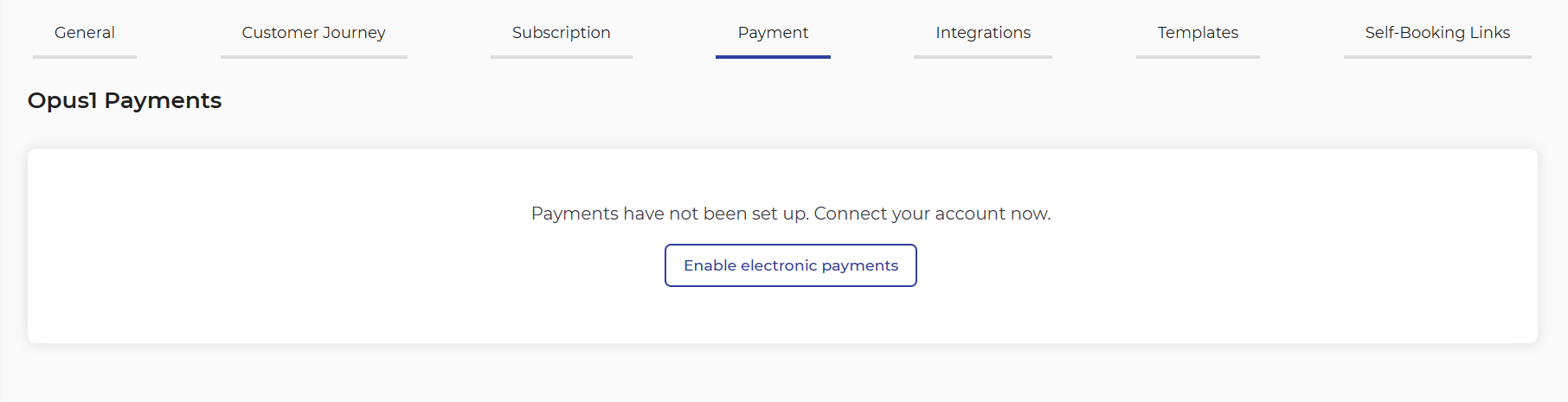
- Log in to opus1.io and navigate to Settings > Business > Payment.
- Click Enable Electronic Payments:
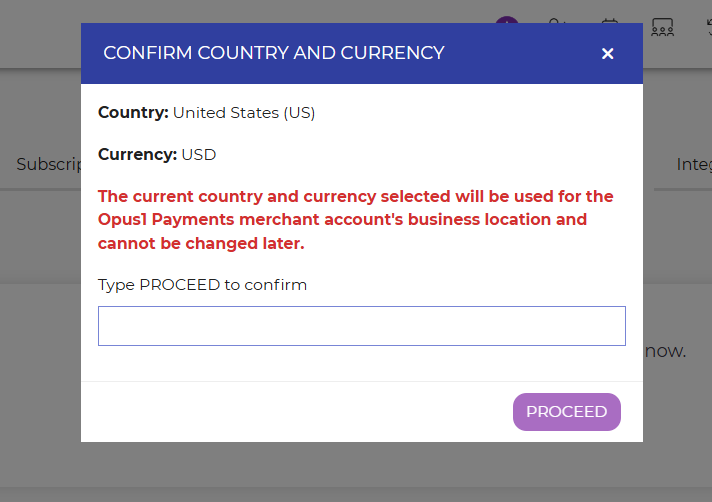
- Confirm your country and currency when prompted:
- You'll be redirected to Stripe. Create your login and enable two-factor authentication (2FA) when prompted.
- Complete the Stripe onboarding form (see What Stripe will ask for below).
- Once finished, Stripe will return you to Opus1.io. Your account will show as connected under Settings > Business > Payment.
💡 Tip: Set up 2FA with an authenticator app rather than SMS if you have the option. It's more reliable and keeps your payout account more secure.
Setup by business type
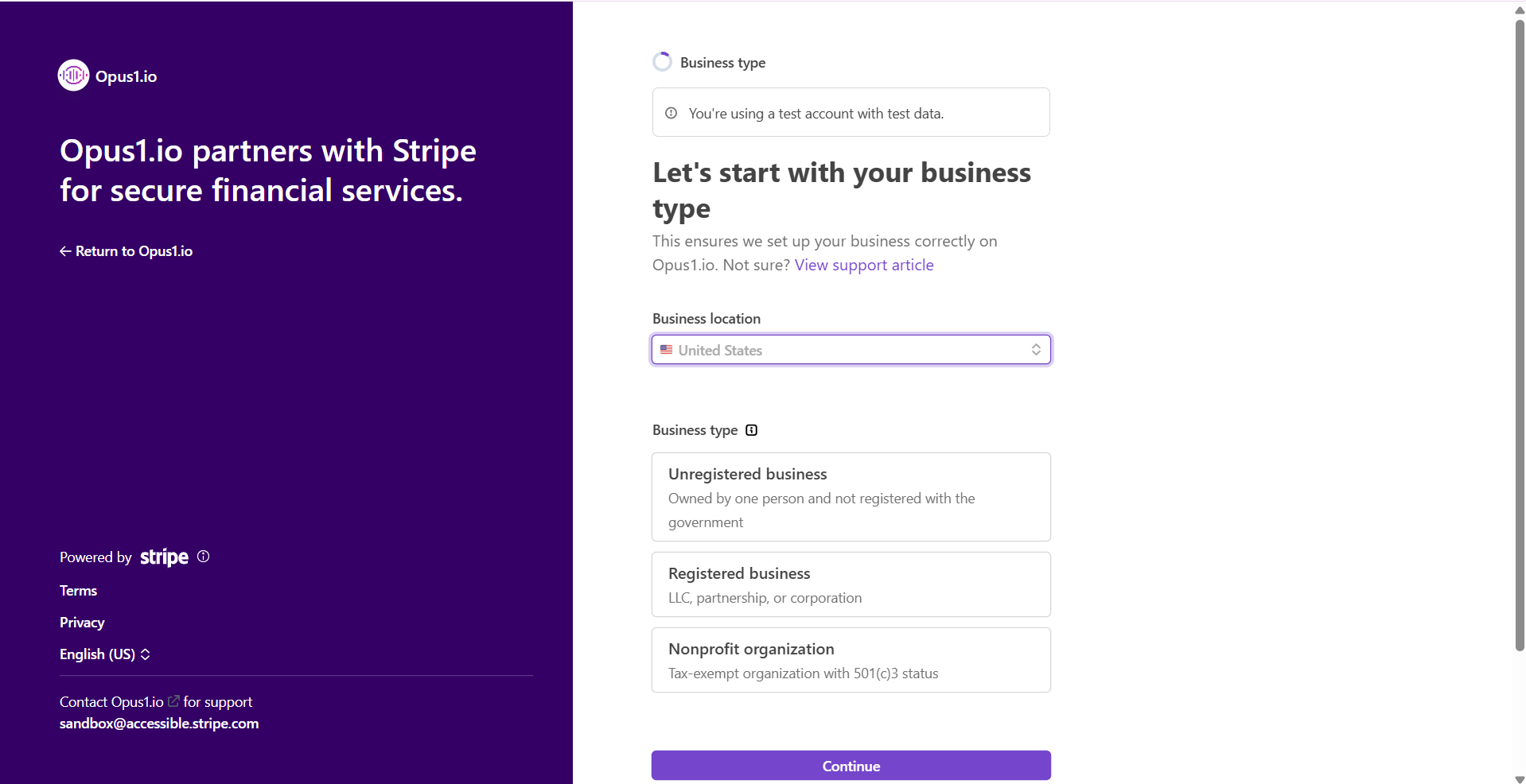
Stripe collects different information depending on your business structure. Select the type that fits your studio:
| Business Type | Who this applies to | What Stripe asks first |
|---|---|---|
| Unregistered business | Sole proprietors not formally registered with the government | Whether your business has an EIN |
| Registered business | Studios with a formal legal structure (LLC, S-Corp, etc.) | Your specific business structure |
| Nonprofit organization | 501(c)(3) or similar entities | Same flow as registered businesses |
ℹ️ Note: Most independent studio owners are unregistered sole proprietors. If you're not sure which category applies, check with your accountant or look at how your business files taxes.
What Stripe will ask for
Business details
| Field | What to enter | Why it matters |
|---|---|---|
| Legal Business Name | Must match IRS-issued documents exactly, including capitalization and punctuation. Check your Letter 147C or SS-4 Confirmation Letter if unsure. | Mismatches cause verification failures and payment delays. |
| Business Name (DBA) | Your operating name, if different from your legal name (e.g., "Riverside Music Studio") | This is what families may recognize. |
| Business Address | Physical location where you operate — may differ from your registered address | Required for identity and compliance verification. |
| Industry | Choose the option that best matches your services | Helps Stripe satisfy risk and compliance requirements. |
| Product Description | 1–2 sentences describing what you sell. Include when you typically charge customers (e.g., "Monthly tuition billed on the 1st" or "Charged at time of enrollment"). | Stripe uses this to assess your account. Be specific — vague descriptions can slow approval. |
| EIN | Your Employer Identification Number, or SSN if used for business taxes | Required for IRS compliance. |
| Business Website | Your public-facing website URL | Must be a live, publicly accessible site. |
Business representative
This is the person legally responsible for the business — typically the owner.
| Field | What to enter |
|---|---|
| Legal Name | As it appears on government ID (passport, tax records) |
| Date of Birth | Full date of birth |
| Home Address | Residential address |
| Phone Number | A valid contact number |
| Last 4 digits of SSN | Required by Stripe to satisfy regulatory obligations |
Bank details
Add the account where Stripe will send your payouts. This is typically your business checking account.
Public details
These fields control what families and their banks see when a charge appears — getting them right reduces confused calls and chargebacks.
| Field | What to enter | Why it matters |
|---|---|---|
| Statement Descriptor | 5–22 characters; should resemble your business name or URL (e.g., RIVERSIDE MUSIC) |
This is what appears on a family's bank or credit card statement. If it doesn't look familiar, they may dispute the charge. |
| Shortened Descriptor | 2–10 characters; appears when individual product descriptors are added | Used in combination with product-level descriptors. |
| Customer Support Phone | Should match what's on your website or social media | Gives families a way to reach you before disputing a charge. |
| Customer Support Address | Should match what's on your website or social media | Required by Stripe for compliance. |
💡 Tip: For your Statement Descriptor, use something a parent would immediately recognize — your studio name or a clear abbreviation. Avoid anything generic like PAYMENT or MUSIC LLC. Unrecognized charges are the leading cause of friendly fraud chargebacks.
FAQ
Q: Do I need an existing Stripe account? No. This setup creates a new Stripe account linked to your Opus1.io studio. If you already have a Stripe account under the same email, Stripe may ask you to connect it — contact Opus1 support if you're unsure which path to take.
Q: How long does verification take? Most accounts are verified within a few minutes of completing onboarding. In some cases, Stripe may request additional documentation, which can take 1–2 business days. You'll receive an email from Stripe directly if more information is needed.
Q: Can I accept payments before verification is complete? Stripe may allow you to begin accepting payments before full verification is complete, but payouts to your bank account will be held until verification finishes. Don't count on funds being available until you've received confirmation that your account is fully verified.
Q: What if my legal business name doesn't match my IRS records? You'll need to resolve the discrepancy before Stripe can verify your account. Contact the IRS to confirm your exact registered name, or consult your accountant. Stripe cannot accept a DBA (doing-business-as) name in place of the legal name.