![Opus1-3-icon-color-1.png]](https://kb.opus1.io/hs-fs/hubfs/Opus1-3-icon-color-1.png?height=50&name=Opus1-3-icon-color-1.png)
Applies to: Owner (set it up) — Owner, Manager, Staff (see forwarded calls on the Calls page)
PLUS Feature: No
Plan: Requires the Opus1 Voice add-on
Last updated: September 21, 2026
Table of Contents
- Overview
- Who can set up forwarding
- Before you start
- The three forwarding rules
- How to turn forwarding on
- What the caller hears
- What you see on the Calls page
- Forwarding, voicemail, and Accept incoming calls
- Limits of call forwarding
- Other Voice questions
- FAQ
- Related Articles
Overview
Your Opus1 Voice number is the number families already have. It is on your website, in their phone, and on the flyer from last spring's recital. But nobody is sitting in front of a browser at 8 p.m., on Thanksgiving, or in the middle of a trial lesson when a prospect calls to ask about summer openings.
Call forwarding sends those calls to a phone that will be answered — your cell, an answering service, or another desk — while the family still dials the same studio number.
Why: A call that reaches a person becomes an enrollment far more often than one that reaches a recording. Forwarding is how you keep the after-hours and holiday calls without asking anyone to keep Opus1 Voice open on a laptop.
Forwarding is set per location by an Owner, and it covers three situations you turn on independently: the location is outside its business hours, the location is explicitly closed for a holiday, or the phone rang during open hours and nobody in Opus1 Voice picked up.
ℹ️ Note: Forwarding decides what happens to a call nobody answered in Opus1 Voice. It is not a live transfer — passing a call you are already on to a colleague is not something Opus1 Voice does today.
Who can set up forwarding
Forwarding lives on the location, not on the Opus1 Voice panel, so it is not something each person switches on for themselves. Owners set the rules and the destination. Everyone else who can use Voice can see that a call was forwarded, but cannot change where it goes.
| Role | Change the forwarding rules and destination | See which calls were forwarded |
|---|---|---|
| Owner | Yes | Yes |
| Manager | No | Yes |
| Staff | No | Yes |
If there is no edit control on Voice Calls Settings, you are either not an Owner, or Opus1 Voice is not enabled on that location yet.
Before you start
Have these in place, because forwarding reads all of them:
- Opus1 Voice is enabled for your school. Opus1 turns Voice on and assigns your numbers — it is not a switch in your own settings. If Voice is off, Clients > Calls shows the upgrade page instead of a call log.
- You are working on the right location. Each Voice-enabled location has its own number and its own settings. Set forwarding on the location that owns the number the family dials. Voice Calls Settings appears on primary locations, not on rooms.
- Your open hours and holiday closures are accurate. Forwarding uses the same open hours and closed days as the rest of Opus1 Voice, so hours that are out of date send calls down the wrong rule. See How do I add open hours to my locations? and How do I ensure that lessons are not booked on holidays when my studio is closed?.
- You have a phone number that will actually be answered. One number serves every rule you turn on for that location.
The three forwarding rules
The three rules share one destination. You are not choosing three numbers — you are choosing which situations send a call to the one number you entered.
| Rule | The label in Voice Calls Settings | It fires when… | It does not fire when… |
|---|---|---|---|
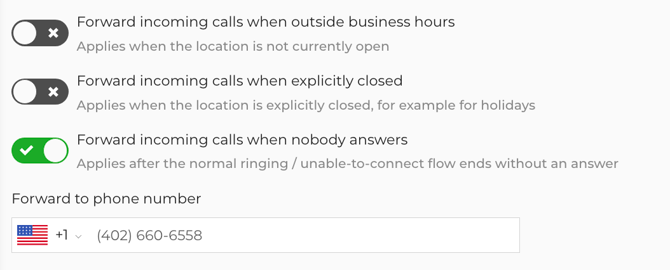
| After hours | Forward incoming calls when outside business hours | The location is outside its open hours and nobody has Accept incoming calls turned on | Someone has Accept incoming calls on — that caller follows the open-hours path instead |
| Holiday or closure | Forward incoming calls when explicitly closed | The location is closed for a holiday or another closure you set, and nobody has Accept incoming calls on | Someone has Accept incoming calls on |
| Nobody answers | Forward incoming calls when nobody answers | The call comes in on the open-hours path, rings through the waiting greeting, and nobody in Opus1 Voice picks up | Someone in Opus1 Voice answers — the call is Answered and forwarding never starts |
Turn on only what you need. A school that wants nights and holidays on the owner's cell, but is happy to take a voicemail during a busy Saturday, leaves Forward incoming calls when nobody answers off.
How to turn forwarding on
- Open Locations / Rooms and open the location whose Voice number should forward.
- Find Voice Calls Settings and open it for editing:

- Turn on the rules you want: Forward incoming calls when outside business hours, Forward incoming calls when explicitly closed, Forward incoming calls when nobody answers.
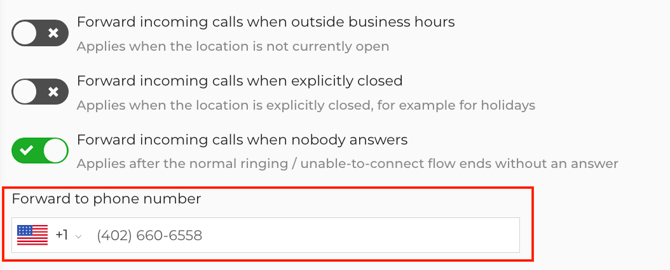
- Enter your destination in Forward to phone number. The field appears once a rule is on, and it is required — saving with a rule on and the field empty shows Enter a phone number to forward missed calls to:
- Save the location's Voice settings.
Nothing is tested at save time. Opus1 Voice does not place a call to check the number, so a typo will not surface until a family calls and the wrong phone rings. Call your own studio number after hours once, before you rely on it for a holiday weekend.
To stop forwarding, turn the rules off and save. Clearing the number while a rule is still on will not save.
⚠️ Warning: If you turn on all three rules, there is no path left on which a caller could leave a message, so Allow voicemails is switched off for that location. Leave at least one rule off if you still want Opus1 Voice voicemail on that path.
What the caller hears
Families dial the studio number as they always have. They are never shown or told the destination number.
| Situation | With that rule on | With that rule off |
|---|---|---|
| After hours, nobody accepting calls in Opus1 Voice | The call goes straight to your destination. The after-hours greeting and voicemail are skipped. | The after-hours greeting plays, then voicemail if Allow voicemails is on |
| Explicitly closed for a holiday, nobody accepting calls | The call goes straight to your destination. The closed greeting and voicemail are skipped. | The closed greeting plays, then voicemail if enabled |
| Open hours, the call rings and nobody picks up | The caller hears your opening greeting and the waiting greeting while staff are notified, then the call goes to your destination instead of the unable-to-connect greeting | The unable-to-connect greeting plays, then voicemail if enabled |
When someone at the destination picks up, the family is talking to that phone, not to an Opus1 Voice browser session.
If nobody picks up there, the call does not come back to Opus1 Voice. The destination rings the way any call to that number would, and then whatever that phone does with an unanswered call takes over — on most cells and landlines, the carrier's own voicemail answers and the family leaves their message in that mailbox. If nothing answers at all, the call ends there.
⚠️ Warning: A message left on your cell's voicemail is not in Opus1.io. It is not recorded, transcribed, or summarized, it is not on Clients > Calls, and nobody else at the school can listen to it. Together with the missed-call email not firing on a forwarded call, an after-hours call that ends in your personal voicemail leaves no trace in Opus1.io beyond the Forwarded to row. If the front desk needs to see those messages, forward to a number the whole office can reach — an answering service or a shared line — rather than one person's cell.
For what a caller hears on the paths you have not set to forward, see Call Flows Guide.
What you see on the Calls page
Forwarding does not create a new outcome on the Calls log. The call still gets one of the missed labels, with the destination shown underneath.
Open Clients > Calls and look at a forwarded call. You will see the usual outcome — Missed, Missed (Outside of open hours), or Missed (Closed) — with Forwarded to and the destination number directly under that tag. The same line appears on the call detail.
A forwarded call is not marked Answered, even when your cell picks up and you have a ten-minute conversation. In Opus1 Voice, Answered means someone took the call inside Opus1 Voice. Read the labels as "nobody answered this in Opus1, and here is where it went instead." For what each outcome means, see What do the Outcome Statuses mean on Voice calls?.
That has one practical consequence for your callback list: the two yellow labels no longer mean a family went unheard. Filter on Forwarded to being present before you start returning calls, or you will call back families you already spoke to last night.
Forwarding, voicemail, and Accept incoming calls
These three answer the same question — what happens when the studio phone rings and the front desk is not on it — in three different ways.
| Tool | What it is for | Who turns it on | What the caller gets |
|---|---|---|---|
| Call forwarding | Send the call to a phone that is not logged into Opus1 Voice | Owner, on the location's Voice Calls Settings | Connected to your destination number |
| Allow voicemails | Take a message on any path that does not forward | Owner, on the location's Voice Calls Settings | A tone, then up to five minutes to leave a message |
| Accept incoming calls | This person is ready to take calls in Opus1 Voice right now | Each Owner, Manager, or Staff member, on their own Voice panel | Rings that person in Opus1 Voice |
Accept incoming calls is the one that surprises people, because it overrides your hours. Someone who leaves it on overnight tells Opus1 Voice the studio is available, so that call follows the open-hours path and your after-hours and holiday forwarding never run. The nobody-answers rule still applies, which is the reliable way to catch those calls either way.
Limits of call forwarding
- It does not transfer a call already in progress. Handing a live caller to another admin is not available in Opus1 Voice today.
- It does not allow a different destination per rule. All three rules use the same Forward to phone number.
- It does not accept a non-US destination number.
- It does not cover a second location. Each Voice-enabled location has its own settings and its own destination.
- It does not apply to rooms — the settings sit on the primary location that owns the number.
- It does not forward text messages. Opus1 Voice and Opus1 SMS are separate.
- It does not send the missed-call email for a call that was forwarded. The call is still on Clients > Calls with Forwarded to, but no email arrives.
- It does not change who can answer in Opus1 Voice. Limited Staff still have no access.
Other Voice questions
| You want to… | Go here |
|---|---|
| Know what a caller hears on each path when you are not forwarding | Call Flows Guide |
| Understand Missed, Missed (Outside of open hours), and Missed (Closed) | What do the Outcome Statuses mean on Voice calls? |
| Check Opus1 Voice pricing, extra lines, recording access, or call transfers | Opus1 Voice FAQ |
| Fix microphone, speaker, or browser problems so staff can answer in Opus1 Voice | Voice Best Practices |
| Move your existing studio number onto Opus1 Voice | Letter of Authorization Template |
FAQ
Can I forward to my personal cell phone?
Yes, as long as it is a US number. Enter it in Forward to phone number. Families keep dialing the studio number — your cell number is never shown to them.
Can I send nights to my cell and holidays to an answering service?
Not from one location's settings. There is one destination, and the three rules decide which situations use it. If you need two different phones, the practical workaround is a destination that can route the call onward, such as an answering service or a cell with its own forwarding.
Why did an after-hours call ring the front desk in Opus1 Voice instead of my cell?
Someone had Accept incoming calls turned on, which tells Opus1 Voice the studio is open. After-hours and holiday forwarding do not run on that call. Turn the toggle off when you leave, or turn on Forward incoming calls when nobody answers so a call that rings out still reaches you.
We have two locations. Does setting this once cover both?
No. Forwarding is configured per location, on the location that owns the number the family dialed. Set it on each Voice-enabled location, and note that the destination can be the same number for both.
Can I transfer a call I have already answered to another teacher?
No. Opus1 Voice does not support live call transfer today. Forwarding only redirects calls that were never answered in Opus1 Voice.
Related Articles
- Call Flows Guide — what the caller hears at each step on the paths you have not set to forward
- What do the Outcome Statuses mean on Voice calls? — reading Missed and the two closed labels on Clients > Calls
- Opus1 Voice FAQ — cost, extra lines, who can use Opus1 Voice, and recording access
- How do I add open hours to my locations? — the hours that decide which forwarding rule a call falls under
- How do I ensure that lessons are not booked on holidays when my studio is closed? — adding the closures that trigger the explicitly-closed rule
- Voice Best Practices — microphone, speaker, and browser setup for answering inside Opus1 Voice