![Opus1-3-icon-color-1.png]](https://kb.opus1.io/hs-fs/hubfs/Opus1-3-icon-color-1.png?height=50&name=Opus1-3-icon-color-1.png)
Applies to: Owner, Manager, Staff
PLUS Feature: No
Plan: Requires SMS
Last updated: September 18, 2026
Table of Contents
- Why an unnamed thread costs you time
- Which path to use
- Who can link a conversation
- Before you start
- How to link an unnamed conversation
- What happens after you link
- When Link is missing or greyed out
- If the thread shows the wrong name
- What linking does not change
- FAQ
- Related Articles
Why an unnamed thread costs you time
A parent texts your studio number from a phone Opus1.io has never seen — a work phone, a second parent, a new family who got your number from a flyer. The conversation list shows a formatted phone number where a name should be.
Whoever is at the front desk cannot open that person's profile, cannot see whether they are enrolled, and cannot tell a current family from a prospect. So they answer carefully, or they ask who's calling, and the next person on the desk starts the same guessing over again.
Why: Linking turns a raw phone string into a person — one shared inbox where every thread has a face, a profile, and a history. It takes about 15 seconds and it only has to happen once per number.
Opus1.io names most conversations by itself. When an incoming text comes from a number already saved as someone's primary phone, the thread arrives with their name on it. This article is for the numbers that do not match anything yet.
ℹ️ Note: Instant Messaging is a premium feature. If it is not enabled for your school, Clients > Instant Messaging shows a message saying so instead of the inbox. Owners and managers cannot switch it on themselves — contact your customer success manager or support@opus1.io.
Which path to use
Three different situations look similar in the inbox. Pick the row that matches what the thread header is showing you.
| What you're looking at | What to do | Why |
|---|---|---|
| Phone number in the header, and the person is already in Opus1.io | Link to existing client | Fastest fix. Attaches the number to a profile that already has their enrollment and history. |
| Phone number in the header, and the person is not in Opus1.io yet | Create client | Builds the profile with the number already filled in. Avoids typing it twice. |
| A name in the header, but it's the wrong person | Relink the thread from the same header | Moves the conversation to the right client without unpicking phone numbers by hand. |
Who can link a conversation
There is no separate permission for linking. Anyone who can open Instant Messaging can name an unnamed thread, and there is no setting an owner turns on or off to allow it.
| Role | Open Instant Messaging | Link an unnamed conversation | Turn SMS on for the school |
|---|---|---|---|
| Owner | Yes | Yes | No |
| Manager | Yes | Yes | No |
| Staff | Yes | Yes | No |
| Limited Staff | No | No | No |
Staff see every thread on the selected studio SMS number, not only the families they teach. Families never see this inbox at all — they simply text your studio number from their own phones.
Before you start
- You are Staff or above and can open Clients > Instant Messaging.
- If your school has a separate SMS number per location, the right number is selected. A conversation belongs to the number it arrived on.
- The thread header shows a phone number, not a name.
- You know who the number belongs to, and that person already has a profile in Opus1.io.
- That person does not already have a primary phone saved. If they do, Link stays greyed out.
How to link an unnamed conversation
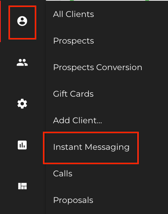
- Go to Clients > Instant Messaging, or click the messages icon in the top navigation bar.
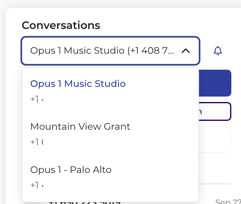
- If your school has more than one SMS number, confirm the correct number is selected.
- Open the conversation whose title is still a formatted phone number.
- In the thread header, click Link to existing client.

- In the Link to existing clientwindow that opens, start typing in the client's name in Client field. You can search by first name, last name, email address, or phone number.
If the client is new: Type their name and click Create & Link - Select the person from the results. Each result shows their name, and their photo if they have one.
- Click Link.
A confirmation appears and the thread immediately takes the client's name.
If nobody matches what you type, the results list stays empty. Close the window and either search another way — an email address often works when a nickname doesn't — check whether the person exists under an account manager's name, or use Create client.
💡 Tip: Opening the window changes nothing. Close it with the X and the conversation stays exactly as it was. The association is written only when you click Link.
Creating a new client from the thread instead
When the number belongs to someone who is not in Opus1.io yet, click Create client in the same thread header. The new client form opens with this phone number already filled in as the primary phone. Finish the profile and save, and the conversation shows their name the same way any other named thread does.
⚠️ Warning: Create client always makes a new person — it does not check whether that family is already in your account. If you are not sure, search Clients first. Cleaning up a duplicate profile afterwards takes far longer than the search does.
What happens after you link
Opus1.io saves the conversation's number as that client's primary phone. From then on, the thread belongs to that person.
| Where | What changes |
|---|---|
| Thread header | The client's name replaces the phone number. Hovering still shows the number, and their status if they are a prospect. Clicking the name opens their profile. |
| Conversation list | The row shows the client's name and photo. Unlinked rows have no photo and are still titled with the phone number. |
| Header buttons | Link to existing client and Create client disappear — the thread is named now. |
| The messages | Nothing. Same number, same studio SMS number, same history, same place in your inbox. |
When Link is missing or greyed out
Link to existing client doesn't appear in the header. The thread is already linked to someone so the header offers the relink control instead.
Link is greyed out after you select someone. The reason shown is person already has phone number. That client already has a primary phone saved, and this window will not replace it. You have three ways forward:
- Check whether you picked the right person. A parent and a teenager with similar names are easy to mix up.
- Open the correct client's profile, save this number as their primary phone yourself, then return to the inbox — the thread picks up their name.
- If they genuinely are not in Opus1.io, use Create client instead.
The whole inbox is missing. Instant Messaging is a premium feature and has to be enabled for your school by Opus1.io. If you see an upgrade message instead of conversations, contact support@opus1.io or your customer success manager. If the inbox loads for your colleagues but not for you, check whether your role is Limited Staff.
If linking fails outright, try once more, then contact support@opus1.io with the conversation's phone number, the client you expected to attach, and which studio SMS number was selected.
If the thread shows the wrong name
A conversation can end up on the wrong person — a number saved on a sibling's profile, or two family members who share a phone and the thread followed the wrong one. You do not have to unpick the phone numbers by hand. The thread header carries a relink control in the same spot where an unnamed thread shows Link to existing client.
- Open the conversation showing the wrong name.
- In the thread header, click the relink control.
- Search for the person the conversation should belong to, the same way you would when linking an unnamed thread.
- Confirm the change.
The conversation list and thread header follow the person you chose. Every message stays on the thread — you are not starting a second conversation and you are not deleting anything.
✅ Best practice: Keep one primary phone per number. When a mother and father share a household phone, put it on the profile of whoever actually replies to texts, and keep the other parent's own mobile on theirs. Two profiles competing for one number is what produces a thread with the wrong name in the first place, and relinking treats the symptom rather than the cause.
If you would rather move the number itself
Relinking is the fast path. Editing the profiles directly does the same job and is worth knowing when the underlying phone numbers are wrong, not just the thread:
- Open the client who should not have this number and remove it from their primary phone.
- Open the client who should have it and save the number as their primary phone.
A conversation is named by matching its number to whoever has that number as their primary phone, so the thread follows the change.
What linking does not change
Linking names a thread. That is all it does. It does not:
- Send, schedule, or delete a text
- Create a second conversation, or merge two conversations
- Close or reopen, or change the Active status of the thread
- Replace a primary phone that is already on the client's profile
- Override an opt-out. Someone who has replied STOP is still opted out after you link them
- Change who can see Instant Messaging. Limited Staff and families still cannot open this inbox
FAQ
A family texted us and the thread already had their name on it. Did someone link it? Probably not. If that number was already saved as their primary phone, Opus1.io names the conversation the moment the text arrives. Linking is only needed for numbers it cannot match.
Can I search by phone number instead of by name? Yes. The search matches first name, last name, email address, and phone number. The results list shows names, so searching by number is a good way to confirm you have the right person when two families share a surname.
We have an SMS number for each location and I think I linked on the wrong one. Each conversation belongs to the number it arrived on, so linking on one location's inbox does not touch another's. Confirm which number is selected, then check that thread. Linking never merges conversations across numbers.
Does the family see any of this? No. Everything described here happens inside your staff inbox. From the family's side, they texted your studio number and got a reply.
Related Articles
- SMS: Frequently Asked Questions — what SMS costs, which of your phone numbers are eligible, and how message limits are counted
- Deleting / Merging Duplicate Accounts — the cleanup if Create client produced a second profile for a family you already had
- How do I mark SMS conversations as closed? — clearing a named thread off the desk once it's handled
- Creating and Using SMS Templates — saved replies for the questions a newly linked family usually asks first