![Opus1-3-icon-color-1.png]](https://kb.opus1.io/hs-fs/hubfs/Opus1-3-icon-color-1.png?height=50&name=Opus1-3-icon-color-1.png)
Before You Begin
- Ensure you have login access to both Stripe accounts (legacy and new Opus1 Payments account).
- You should be logged in with administrator credentials on both accounts: in the legacy Stripe account to authorize the transfer, and in the new Opus1 Payments account to accept the transfer.
Step 1: Verify your Opus1 Payments account ID.
-
You can do this by viewing it in your Stripe dashboard. You will need this ID for the process.
Step 2: Log in to Your Legacy Stripe Account
- Sign in to your legacy Stripe account.
- From the Stripe dashboard, ensure you are viewing the legacy account that currently contains your customer data.
Step 3: Open the Customers Page
- In the left-hand navigation menu, click Customers.
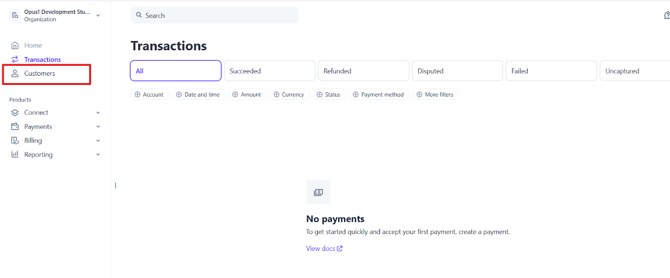
Step 4: Start the Customer Copy Process
- Click the Copy button.

- Select Copy all customers to begin copying your entire customer list.
Step 5: Enter the Destination Account ID
- In the destination field, enter your new Opus1 Payments account ID. This tells Stripe where the customer data should be copied to.
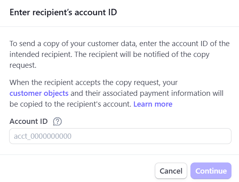
Step 6: Confirm the Copy
- Click Continue to start the process.
- The administrator of the legacy Stripe account must authorize the copy, so ensure you are logged in with the correct admin credentials.
Step 7: Authorize the Copy in the Opus1 Payments Account
- Switch to your Opus1 Payments Stripe account using the account selector in the upper-left corner.
- Navigate to Customers.
- You will see a banner prompting you to Authorize and Accept the incoming customer data.
- Click Authorize and Accept.
Once approved, the customer data will begin copying. The process may take up to 30 minutes, depending on the number of customers being transferred.
Step 8: Contact Your Onboarding Specialist
After the copy is complete, contact your opus1.io onboarding specialist. They will assist you with ensuring the customers are mapped appropriately.