![Opus1-3-icon-color-1.png]](https://kb.opus1.io/hs-fs/hubfs/Opus1-3-icon-color-1.png?height=50&name=Opus1-3-icon-color-1.png)
Applies to: Teachers (Limited Staff, and Staff who teach)
PLUS Feature: No
Plan: All
Last updated: November 3, 2026
Table of Contents
- Before you start
- Find your student's make-up credits
- Book the make-up or send a proposal
- If something is missing or greyed out
- FAQ
- Related Articles
Before you start
Your school decides how much you can do with make-up credits in Opus1.io. You might be able to view your students' credits only, or also send proposals, book make-ups, or both. The buttons you see match what your school has turned on. If something in this article isn't on your screen, see If something is missing or greyed out.
The steps work the same way on a phone or a computer. On a phone the layout is tighter, but the buttons are the same.
Why: You know your schedule and you see the family every week. Booking the make-up at the end of a lesson, or sending a time that evening, gets it done before the credit expires.
Find your student's make-up credits
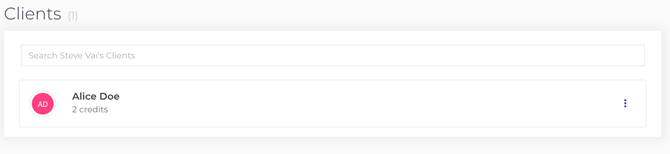
- Log in to Opus1.io and open your own profile, the page that lists your Clients.
- Look under each student's name for a credit count.
- Tap or click the three-dot menu (⋮) next to the student.
- Choose View student credits.
You'll see each credit, what it's for, how many visits are left, and when it's valid until. Book before the valid-until date.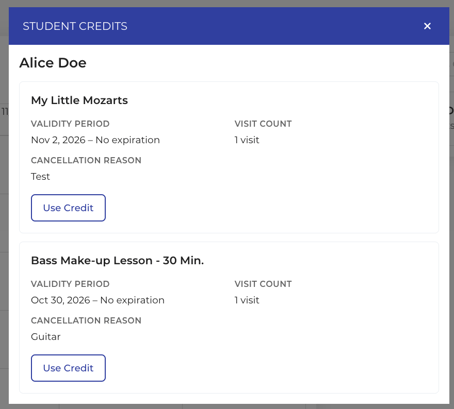
ℹ️ Note: You only see credits that are yours to make up. If a family says they have four credits and you see two, the other two belong to another teacher's lessons.
Book the make-up or send a proposal
- In View student credits, tap Use Credit on the credit.
- Pick a time:
- Private lesson: choose a date, then one of your open times. Opus1.io fills in the room.
- Group class: choose a class and date. The list starts with classes you teach or co-teach. Clear the filter to see others. Past class dates can be chosen too.
- Choose one:
- Confirm and Book books it now. The credit is used, the make-up shows on your schedule or class roster, and the family gets the usual booking confirmation.
- Send Proposal opens a screen where you choose who in the family gets the email and add an optional message. The family opens the link in the email and confirms the booking.
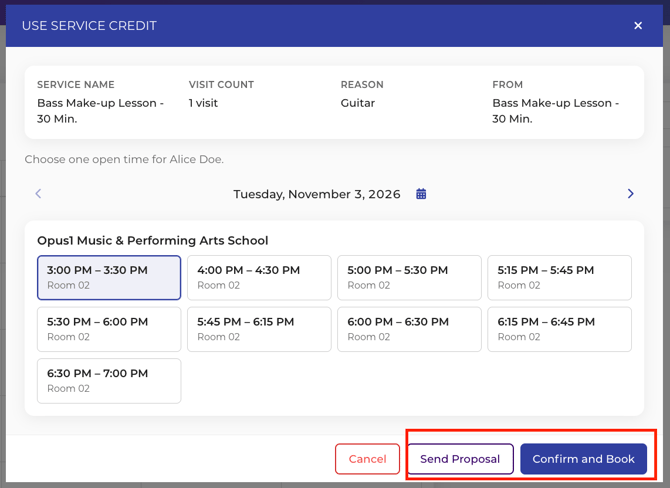
⚠️ Warning: A proposal doesn't hold the time. If someone else books it first, the family loses that slot. When the family has already said yes, use Confirm and Book.
💡 Tip: If the family agrees to a make-up at the end of a lesson, book it right then, while they're still in the room.
If something is missing or greyed out
- No credit counts at all. Make-up access is off for you. Your manager can turn it on from your profile.
- Credits, but no Use Credit button. Your access is view-only. Let the family know what they're owed, and the front desk books the make-up.
- Use Credit is greyed out. Read the note under it. Either the credit isn't valid yet, or the original lesson hasn't been paid for. Once that changes, you can use it.
- A credit you expected isn't there. It's probably assigned to another teacher, often a substitute who covered the canceled lesson. Ask your manager to reassign it.
- The time you want isn't offered. Only your open times appear, and Limited Staff can't add times themselves. Ask your manager or front desk to open the time in your availability, or to book the make-up for you.
FAQ
Can I book a make-up for another teacher's student?
No. You only see your own students' credits, and only credits assigned to you. Ask the front desk for anything else.
Does sending a proposal use up the credit?
No. The credit is only used when the family books from the proposal, or when you choose Confirm and Book.
Can the family still book the make-up themselves?
Yes. Families can still use their credit from their own Opus1.io account. What you do here just gets it booked sooner.
Can I change what I'm allowed to do with credits?
No. Your school sets your make-up access in Opus1.io. If you'd like to send proposals or book make-ups and can't, ask your manager.
Related Articles
- What do my teachers see when they login? — everything else on your teacher profile
- Sending Proposals — what the family receives when you send a proposal
- If I send a proposal, is that spot automatically put on hold? — why proposals don't reserve the time
- Can Limited Staff update their own availability? — who can open new times on your schedule