![Opus1-3-icon-color-1.png]](https://kb.opus1.io/hs-fs/hubfs/Opus1-3-icon-color-1.png?height=50&name=Opus1-3-icon-color-1.png)
Applies to: Owner, Manager, Staff
PLUS Feature: No
Plan: All
Last updated: October 28, 2026
Table of Contents
- Overview
- How to tell a hold is in place
- Which fix to use
- End the subscription and enroll again
- Extend a hold that is already running
- FAQ
- Related Articles
Overview
A subscription hold pauses a student's lessons and billing for the dates you choose. The moment you select Place On Hold, Opus1.io adjusts the invoices that overlap those dates and, unless you turned the option off, takes the lessons in that window off the calendar. Because so much changes at once, Opus1.io treats the hold dates as final. There is no Edit, Extend, Shorten, or Cancel button, and Opus1.io support cannot change the dates for you either.
That does not leave you stuck. Each of the usual situations has a fix, and the right one depends on two things: whether the hold has started yet, and whether the student still needs time away. Picking the right fix matters because some of them keep the student's enrollment exactly as it is, while others mean setting up a new subscription and rebooking lessons.
This article is for owners, managers, and staff. Families cannot change a hold from their own Opus1.io login, so if a parent asks, the change has to come from your front desk.
How to tell a hold is in place
Open the client profile and find the subscription under Subscriptions. When a hold is saved on it, the subscription line shows the hold's start and end dates, and the Hold button reads Hold Scheduled and does not open.
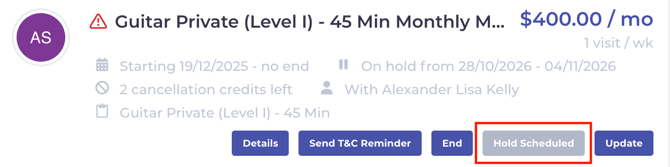
The hold stays on that subscription until its end date has passed. Opus1.io then clears it, lessons after that date carry on as normal, and the Hold button becomes available again. There is nothing to click to resume the subscription.
If you try to place another hold while Hold Scheduled is showing, Opus1.io returns the error Subscription already on hold. Only one hold can sit on a subscription at a time.
Which fix to use
Find the situation that matches, then follow the fix on the same row.
| Situation | What to do | Keeps the same enrollment? |
|---|---|---|
| The student is coming back earlier than planned | End the subscription on the day they return, enroll them again starting that day, and rebook their lessons. Do not place a hold on the new subscription. | No |
| The hold has not started and the family no longer needs it, or a staff member placed it by mistake | End the subscription, enroll the student again from today or the original start date, and rebook any lessons the hold already cancelled. | No |
| The hold has not started and the dates are wrong | End the subscription, enroll the student again, then place a new hold with the right dates. The first-month rule below applies. | No |
| The hold is running and the student needs more time | Place a second hold the day the first one clears, or end the subscription and enroll again from the new return date. See Extend a hold that is already running. | Either |
| The hold has ended and the family wants another break | Nothing to undo. Select Hold on the same subscription and place a new hold. | Yes |
The first-month rule. A hold cannot start in the first calendar month of a subscription. A new subscription that starts in September cannot be put on hold until October. If the corrected hold needs to start in the same month you re-enroll, Opus1.io will return Hold cannot start on first subscription month, and the student is better served by starting the new subscription on their return date instead.
End the subscription and enroll again
Ending and re-enrolling is the in-product way to undo a hold, because a new subscription starts clean with no hold on it.
- Open the client profile, find the subscription under Subscriptions, and select End.
- Choose the date the old subscription should stop. For a student who is returning early, that is the day they come back.
- Book the student's recurring lessons again, or enroll them in the group class again, starting on the day they resume, and choose the payment plan. This creates the new subscription.
- Before you confirm checkout, check the total. A payment plan with a sign-up fee can add it again for the new enrollment, and a family who already paid one at their first enrollment will not expect a second.
The new subscription is a new enrollment, so Opus1.io does not copy everything across.
Set these again on the new subscription: the payment plan and price, autopay, payment reminders and any secondary payer, recurring discounts, recurring invoice notes, and the teacher, day, time, room, and location for the lesson series.
These carry over: the client and payer records, the card or bank account on the payer (autopay still has to be turned on again), and household discounts your school applies to new enrollments. Service credits carry over when you turn on Transfer associated service credits to the new subscription while ending.
These do not come back: lessons that were cancelled for the hold, which you rebook if the student should attend them, and invoices that were already paid. Paid invoices stay on the old subscription and are not refunded to the card. Where the hold reduced a paid invoice, the difference is on the account as a monetary credit.
Extend a hold that is already running
Days cannot be added to a hold once it has started. Opus1.io gives you two ways to give the student more time, and each one has a trade-off.
Place a second hold when the first one clears. On the day after the first hold's end date, the Hold button is available again. Select it, turn on Hold starts now, and set the new end date. The student keeps the same subscription, teacher, time slot, autopay, and discounts. The trade-off is timing: the second hold can only start once the first has cleared, so someone at the front desk needs to place it that day, before the student's next lesson.
End the subscription and enroll again from the new return date. End the current subscription, then enroll the student again starting on the day they will actually return. You can do this today rather than waiting for the first hold to clear. The gap between the old end date and the new start date is the extra time off, and nothing is billed for it. The trade-off is setup: everything listed under End the subscription and enroll again has to be set again, and the student's regular time slot is open for other families to book during the gap.
Whichever way you place a hold, the end date has to fit these limits, or Opus1.io will not save it:
- The payment plan's maximum. Opus1.io multiplies How many times can the subscription be put on hold per period? by How long can the subscription be put on hold?. A plan set to 2 and Month allows a hold of up to about two months. A longer hold returns Hold longer than allowed by plan.
- About nine months from today. A later end date returns Hold end date is too far in the future.
- The subscription's own end date. A hold cannot run past the date the subscription ends, which returns Cannot hold after subscription end date. For a group class, it also cannot run past the class's end date, which returns Cannot hold after session end date.
FAQ
Can Opus1.io support remove a hold or change its dates for me?
No. Opus1.io support cannot edit, shorten, or remove a saved hold. The fixes in this article are the way to change course, and ending and re-enrolling covers every case where the hold itself needs to go.
Can a family cancel or change their own hold?
No. Only owners, managers, and staff can place holds in Opus1.io, and nobody can edit one after it is saved. If a family asks to come back early, use the first row of the table under Which fix to use.
Do students get makeup credits for lessons the hold cancelled?
No. Opus1.io treats a hold as a planned pause rather than a cancellation, so it does not issue service credits for the lessons in the hold window. If a paid invoice was reduced by the hold, the family has a monetary credit instead.
Does this work the same way for a group class student?
Yes. Opus1.io applies the same rules to a hold on a group class subscription, so the same fixes apply. When you end and re-enroll, enroll the student in the group class again rather than rebooking a lesson series, and the new hold cannot run past the class's end date.
Related Articles
- How do I use subscription holds? — placing a hold, and what it changes for lessons, billing, and payroll
- What does "Plan doesn't allow hold" mean? — turning holds on for a payment plan, and every other hold error
- How do I end a subscription? — the full steps for the first half of end and re-enroll
- How do I book a recurring appointment? — rebooking the lesson series on the new subscription
- How do I add monetary credits to a client's account? — how account credit works when a paid invoice was reduced
- How do I enroll my clients into group class services? — re-enrolling a group class student after ending their subscription